

Top credit repair software should provide encryption, individual user accounts, access controls, activity records, secure document handling, backups, recovery procedures, session protection, export controls, and clear retention options.
Multi-factor authentication is another important control to check. Features vary by provider, and no single feature makes your business secure or compliant. You must also protect staff devices, passwords, downloaded files, paper records, and connected services.
Credit repair data security matters because your business may handle credit reports, identification documents, account details, contracts, and dispute records. This guide explains which controls to review, what to test, and which duties remain with your business.
Why Does Credit Repair Software Security Matter?

A credit repair business may hold personal and financial information that could expose a client to fraud or identity theft if stolen. Security must cover collection, access, storage, sharing, exports, backups, paper copies, and disposal.
When you choose credit repair software, check what the provider controls and what remains your responsibility. A secure platform cannot correct weak passwords, shared logins, unsafe email, or unprotected downloads.
What Security Features Should Credit Repair Software Have?
Look for controls that protect data, limit access, record actions, and support recovery. Ask the provider to explain them in writing.
| Security Feature | What It Does | What To Ask |
|---|---|---|
| Encryption | Protects stored and transferred data | Is data encrypted during transfer and storage? |
| Individual Accounts | Gives each worker a separate login | Can every worker have a unique account? |
| Permission Controls | Limits access by job duty | Can you restrict viewing, exports, and deletion? |
| Multi-Factor Authentication | Adds a second login check | Is it available for staff and clients? |
| Activity Records | Ties recorded actions to a user | Which actions are recorded, and for how long? |
| Session Controls | Limits unattended sessions | Does the system time out inactive users? |
| Document Controls | Protects file handling | How are files uploaded, shared, and deleted? |
| Backups and Recovery | Restores lost records | How often is recovery tested? |
| Retention and Deletion | Controls how long data remains | Can you set retention rules and request deletion? |
| Incident Procedures | Guides the response to a security event | When will customers receive notice? |
Also ask about independent assessments, service-provider access, updates, and where data is processed. Features may change by plan or user type, so confirm what your subscription includes. Test with fictional data first.
How Should Software Protect Multiple Client Accounts and Documents?

Software should separate client records and restrict access based on staff duties. This reduces the chance of attaching or sending a document to the wrong person. Each staff member should use an individual account. Shared logins hide who viewed or changed a record and make access removal harder.
For example, an intake worker may need to add contact details and upload documents. A dispute specialist may need access to reports, correspondence, and responses. An administrator may need permission to manage staff accounts and exports. Giving every person full access increases risk without helping them complete their assigned work.
Permissions should cover viewing, editing, downloading, exporting, and deleting. Your business must protect every downloaded copy.
What Security Responsibilities Remain With Your Business?
Your provider controls the platform. You control how staff, devices, and connected services use it. Require unique passwords and use a password manager. Turn on multi-factor authentication. Train staff to spot phishing, fake login pages, and unexpected file requests. Update and lock every work device.
Limit downloads and do not send sensitive records through unprotected email. Review connected mailing, texting, storage, scheduling, and marketing services. Remove unused connections. Lock paper records. Set retention and destruction rules. Remove a former worker’s access to software, email, storage, password tools, and devices at once.
The FTC’s business security guidance tells companies to know what personal information they hold, keep only what they need, protect it, dispose of it safely, and prepare for security incidents.
What Are the Legal Aspects of Using Credit Repair Software?

Security laws depend on your information, activities, and location. Software cannot decide which laws apply or make your business compliant. The FCRA Disposal Rule guidance states that businesses and individuals using consumer reports for a business purpose must take reasonable disposal steps. Paper and electronic records should be destroyed so they cannot be read or reconstructed.
The FTC Safeguards Rule applies to covered financial institutions under FTC authority. Coverage depends on business activities. The FTC lists credit counselors and other financial advisers as examples, but that does not automatically cover every credit repair company. Covered businesses have specific security duties. State privacy, security, and breach-notification laws may add others.
Ask a qualified attorney and security professional to review your activities, data, service providers, and location. Do not rely on a vendor’s compliance label as legal advice.
How Should You Test Security During a Software Demonstration?
Use fictional information. Never upload real client records just to test a trial.
Ask the presenter to complete these tasks while you watch:
- Create two staff accounts with different permissions.
- Try to open a record with an account that lacks permission.
- Upload, download, and delete a fictional document.
- Find the activity record for those actions.
- End a session and show the next login.
- Export a fictional client record and inspect the included fields.
- Remove a staff account and confirm that access ends.
- Explain backup, recovery, incident, and vendor-access procedures.
A demonstration does not prove the security of the full system. Review written security information, contract terms, privacy terms, and available independent assessments. You can request a Client Dispute Manager Software demonstration and use the same test for every platform.
How Should You Handle Data Exports and Software Migration?
Treat every export as a new sensitive copy. Ask which fields, documents, notes, letters, responses, and activity records are included. Confirm the format and transfer method. Limit export permission. Protect the files and remove temporary copies after transfer. Check when old access ends and whether the former provider retains copies.
Test with fictional records. Compare fields, dates, documents, notes, and activity history at both ends.
How Client Dispute Manager Software Handles Client Data?
Client Dispute Manager Software states in its current FAQ that client data is stored with encryption and access controls. The FAQ also says users can export client details and other relevant information in standard formats for backup or record keeping. Users remain responsible for handling exported information securely and following applicable data-protection rules.
The Client Dispute Manager Software website also describes secure document handling, centralized client records, dispute tracking, and document storage. These tools can support an organized process, but they do not remove your responsibility for staff access, passwords, devices, downloads, connected services, or legal review.
Before using real client information, confirm the controls available under your current plan. Test permissions, document handling, exports, and account removal during a demonstration. Ask support for written answers about any control you cannot verify yourself.
Start Today and Explore the Features Firsthand!
Credit Repair Software Security Checklist
Use this checklist before approving a platform:
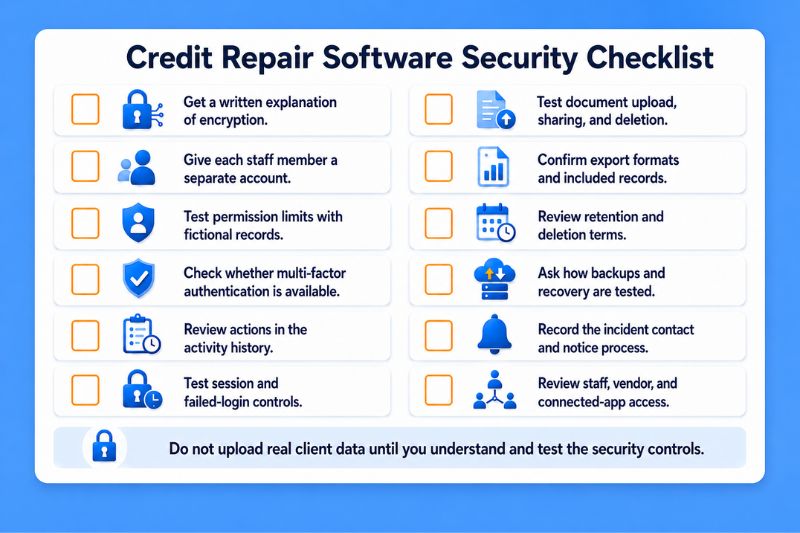
Frequently Asked Questions
Is Cloud-Based Credit Repair Software Secure?
Cloud-based credit repair software can include strong security controls, but cloud hosting alone does not prove that a platform is secure. Review encryption, authentication, permissions, activity records, backups, vendor access, incident procedures, and contract terms. Your staff must also protect passwords, devices, downloads, paper files, and connected apps.
Does Encryption Make Credit Repair Software Secure?
Encryption is an important control, but it does not address every risk. Shared accounts, weak passwords, excessive permissions, unsafe exports, phishing, malware, and poor incident handling can still expose client information. Ask whether encryption protects data during transfer and storage, then review the other controls around access and use.
Should Every Staff Member Have a Separate Software Account?
Yes, when the platform supports separate staff accounts. Individual accounts help you limit access based on job duties, connect recorded actions to one user, and remove one person’s access without affecting the rest of the team. Staff should never share passwords or reuse a former worker’s account.
What Data Should Credit Repair Software Protect?
The system may hold credit reports, identification documents, contact details, account information, contracts, dispute records, letters, responses, notes, and communication history. Protection should cover how that information is collected, transferred, stored, viewed, changed, exported, retained, and destroyed. Your security review should also cover local and paper copies.
Can Security Features Make a Credit Repair Business Compliant?
No. Security features can support your procedures, but the business remains responsible for its legal duties, staff conduct, devices, service providers, paper records, exported files, and incident response. The laws that apply depend on the business’s activities and location. Get qualified advice for your specific operation.
Test the Controls Before You Store Client Data
Choose software only after you have tested how it protects the records your team will handle. Use fictional data, document each result, and request written answers where a demonstration cannot provide proof. Repeat the review when your staff, services, or workflow changes.
Client Dispute Manager currently offers a 30-day free trial with no credit card required. Use the trial to review client records, document handling, access controls, and export options before entering real client information. Check the current offer and terms before you sign up.

Mark Clayborne
Mark Clayborne specializes in credit repair, starting and running credit repair businesses. He's passionate about helping businesses gain freedom from their 9-5 and live the life they really want. You can follow him on YouTube.
Start Today and Explore the Features Firsthand!
Below Is More Content For Your Review:
