Get Started for as Low as $49 for the First Month: Click Here
Written by Mark Clayborne
Last updated on October 6, 2026

Managing credit disputes manually is time-consuming, error-prone, and impossible to scale. The right credit repair software changes that by automating the repetitive parts of the process so you can focus on what requires your judgment.
But not every platform automates the same things or in the same way. This guide walks through the features that matter most, what to look for inside each one, and how Client Dispute Manager Software delivers them.
Whether you are evaluating your first platform or comparing what you currently use against what is available, this breakdown gives you a practical lens for making the comparison.
The most important credit repair software features for automating disputes include automated dispute letter generation, multi-bureau credit report importing, dispute round tracking, analytics dashboards, credit score monitoring, client communication tools, and CRM integrations.
Top-rated credit repair software with automated dispute features handles the workflow from bureau import to letter generation to response tracking without requiring manual steps at each stage.
When evaluating credit repair software for dispute automation, check whether the platform includes automated letter generation, multi-bureau report importing, bureau response tracking with deadline alerts, client progress dashboards, credit score monitoring, dispute letter template libraries, CRM or third-party tool integrations, and built-in client communication tools.
A platform that covers all of these gives you a complete dispute management system rather than a collection of disconnected tools.
Use this checklist when evaluating any credit repair software platform:
| Feature | What It Should Do | Why It Matters |
|---|---|---|
| Automated Dispute Letters | Generate letters based on item type and dispute round | Eliminates manual rewriting per client per round |
| Dispute Letter Templates | Pre-built and customizable letter library | Gives you a starting point for every dispute type |
| Multi-Bureau Report Importing | Pull reports from all three bureaus into one workspace | Gives you the full credit picture for each client |
| Bureau Response Tracking | Log response dates and flag overdue items | Prevents missing 30-day FCRA response windows |
| Analytics Dashboard | Visual progress tracking per client | Keeps you and your client informed at a glance |
| Credit Score Monitoring | Track score changes across dispute rounds | Shows the impact of completed disputes |
| Re-Reported Item Alerts | Flag items that return after removal | Allows fast re-disputing of recurring negatives |
| CRM Integration | Connect with billing and contact tools | Reduces duplicate data entry across systems |
| Client Communication Tools | Email or SMS built into the platform | Keeps client updates in one place |
| Custom Report Generation | Exportable client progress reports | Professional reporting without manual compilation |
| FICO Optimization Guidance | Insight into score factors beyond disputes | Adds value beyond basic negative item removal |
Automated dispute letter generation works by pulling negative item data from an imported credit report, identifying the item type and the bureau reporting it, and using that information to select and populate the appropriate dispute letter template.
The letter is then addressed to the correct bureau, formatted for mailing or electronic submission, and logged in the client’s file.
The key difference between automated and manual letter writing is that automated systems do not require you to identify the right template, fill in the client’s information, format the letter, or track whether it was sent. The platform handles all of that as part of a structured workflow.
When a bureau responds, the system logs the response, updates the client’s dispute status, and prompts you on whether a follow-up dispute is warranted based on the outcome.
That closes the loop on each dispute without requiring you to manually check every open file.
| Feature Area | Strong Platform | Weak Platform |
|---|---|---|
| Dispute Automation | Letters generated automatically by item type | You write or edit every letter manually |
| Letter Templates | Large customizable library with strategy notes | One generic template for all dispute types |
| Bureau Import | All three bureaus, batch or single client | Manual data entry or single bureau only |
| Response Tracking | Automated deadline alerts and status logging | You track response dates in a spreadsheet |
| Progress Dashboards | Visual per-client and portfolio-level views | Text-only status fields with no visual summary |
| Score Monitoring | Built-in tracking with change alerts | Requires logging into a separate monitoring service |
| CRM Integration | Native or API connection to popular tools | No integration; data must be duplicated manually |
| Client Communication | Email and SMS built into the workflow | You send updates from a separate email client |
| Report Generation | Automated, branded, exportable client reports | Manual PDF creation or screenshot-based reporting |
| Compliance Tools | CROA and TSR-aligned workflows built in | No mention of compliance in the platform |

The most comprehensive dispute management features for credit professionals include multi-round dispute tracking, escalation paths for items that verify after an initial dispute, bureau-specific letter formatting, and the ability to manage disputes across dozens of client files simultaneously from a single dashboard.
Comprehensive dispute management also means the platform understands the difference between disputing with a bureau and disputing directly with a data furnisher under the FCRA. Both are valid dispute paths, and a strong platform supports both workflows.

Credit repair software that supports dispute letter templates gives you a pre-built library of letters organized by dispute type: collections, late payments, charge-offs, inquiries, bankruptcies, and more.
Customizable dispute letter templates go further by letting you edit the language, add strategy notes, and save your own versions for specific scenarios. The best platforms include both a ready-to-use library and the flexibility to build your own.
Not all negative items require the same dispute approach. A collection account from an original creditor requires a different letter than an account purchased by a third-party debt collector. A late payment dispute requires different language than a dispute over an account that does not belong to the client at all.
Good dispute letter template libraries are organized by item type and include guidance on which approach to use for each scenario.
The most capable platforms also let you:
Client Dispute Manager Software includes a dispute letter template library built by Mark Clayborne from real credit repair business experience. The templates cover the full range of dispute types and are customizable so you can adapt them to specific client situations.
The 30-day free trial gives you full access to the template library before you commit to a paid plan.
Credit repair software with built-in credit report importing pulls report data from one or more credit bureaus directly into the platform so you can review negative items, identify dispute opportunities, and generate letters without manually re-entering data.
The best platforms support all three major bureaus and allow batch importing for multiple clients. This is one of the highest-leverage features in the platform because it eliminates a significant data entry burden at the start of every client engagement.
Platforms that support multi-bureau importing allow you to pull Equifax, Experian, and TransUnion data into a single workspace for each client. That gives you a complete picture of what is reporting across all three bureaus before you begin building a dispute strategy.
When evaluating bureau import capabilities, check for:
Most credit repair software platforms do not have direct API integration with the three major credit bureaus for real-time data pulls. Bureau data is typically accessed through credit report import tools, third-party bureau resellers, or manual report uploads.
The distinction matters because direct bureau integration would require agreements with each bureau that most software companies do not have.
What good platforms do is make the import process as frictionless as possible so that once you have a credit report in hand, getting it into the software and ready for dispute processing takes minimal time and effort.

Credit repair software with analytics dashboards gives you a visual overview of each client’s dispute progress, including which items are in dispute, which have been resolved, how many rounds have been completed, and how the client’s credit profile has changed over time.
Visual dashboards reduce the time you spend compiling status updates and make it easier for clients to understand their progress without you having to explain it from scratch every time.
I need a credit repair tool that helps track dispute progress. That is one of the most common things credit repair professionals say when they outgrow a manual system. Spreadsheets and paper files break down quickly when you are managing more than a handful of active clients simultaneously.
What to look for in a progress tracking and analytics dashboard:
Detailed analytical reports on dispute outcomes go beyond showing what is currently in dispute. They show the full history of each dispute round, what the bureau’s response was, whether the item was removed, updated, or verified, and what follow-up action was taken.
For credit repair professionals, this level of documentation is important for demonstrating value to clients and for maintaining accurate records in case of compliance review.
Client Dispute Manager Software includes dispute tracking that logs each round’s outcome and builds a running history for every client file. That history is accessible as part of the client record and can be referenced at any point in the engagement.

Credit repair software with built-in credit score monitoring tracks score changes across dispute rounds and alerts you or your client when the score moves significantly. Some platforms also include monitoring for re-reported negative items, which alerts you when a previously removed item reappears on a credit report.
This feature is particularly valuable for clients who have had items removed and want protection against furnishers who re-report inaccurate data.
Score monitoring inside a credit repair platform serves a different purpose than a standalone credit monitoring service. Inside the platform, score tracking is tied directly to the dispute workflow. You can see whether score changes correlate with completed disputes, which helps you demonstrate the value of the work being done and identify whether additional dispute rounds are producing results.
Re-reported items are one of the most frustrating experiences a credit repair client can face. A collection account gets removed after a successful dispute, and then the furnisher reports it again a few months later. Without monitoring, that re-report goes unnoticed until the client pulls their report again.
Platforms that include monitoring for re-reported items alert you when a previously disputed item reappears so you can take action quickly. This feature adds significant value for clients who have already gone through the dispute process and want ongoing protection.

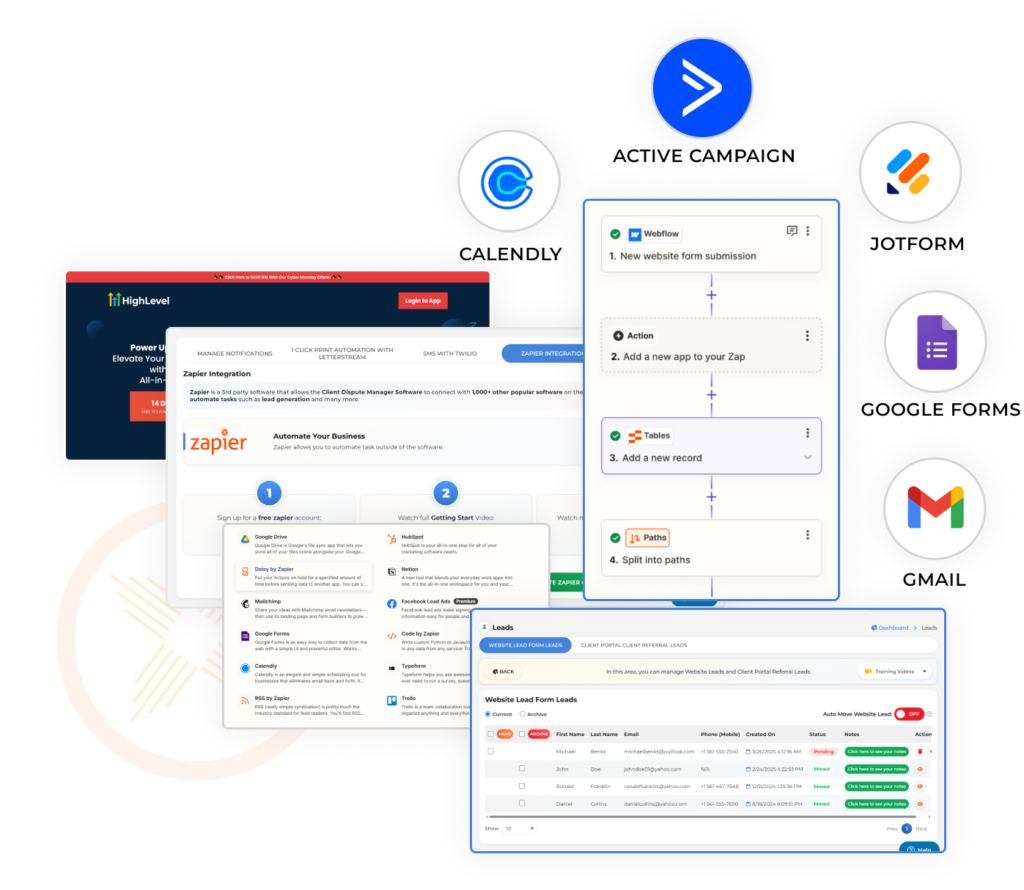
Credit repair software that integrates with popular CRM tools allows you to connect your client management, billing, and communication workflows into a single system instead of maintaining duplicate records across multiple platforms. Good integration support reduces data entry, eliminates the risk of client information being out of sync across tools, and makes it easier to manage a growing business without adding administrative complexity.
For credit repair business owners managing a growing client base, the combination of credit repair software and a CRM is often what separates an organized operation from a chaotic one. The credit repair platform handles disputes. The CRM handles business relationships. Integration keeps both in sync.
What to look for in CRM and third-party integration capabilities:
Credit repair software with built-in client communication tools including email and SMS allows you to send status updates, dispute notifications, and progress reports directly from inside the platform. This keeps all client communication tied to the client file rather than scattered across your personal email inbox.
It also creates a documented communication history that is available as part of the client record, which is useful for compliance and for resolving any disputes about what was communicated and when.
When client communication happens inside the platform, it becomes part of the client record automatically. You do not need to copy emails into a separate system or remember which conversations happened in which channel. Every message, notification, and update is logged alongside the dispute history, the credit report data, and the progress notes.
Key client communication features to look for:
The speed of dispute resolution is largely determined by federal law, not the software. Under the FCRA, credit bureaus have 30 days to investigate and respond to a consumer dispute, with a possible 15-day extension in certain cases. No software can shorten that statutory window.
What software can do is reduce the time between receiving a bureau response and sending the next round of disputes, which shortens the overall timeline by eliminating administrative delays on your end.
Platforms that contribute to faster overall resolution do so in these ways:
The bottleneck in most credit repair operations is not the bureau. It is the time between receiving a bureau response and taking the next action. Software that eliminates that administrative delay produces faster real-world results, even though the bureau’s statutory response window is fixed.

Client Dispute Manager Software is built by Mark Clayborne, a credit repair industry specialist with over a decade of hands-on experience. The platform includes automated dispute letter generation, a customizable template library, multi-bureau credit report importing, round-by-round dispute tracking, client progress dashboards, credit score monitoring, built-in client communication tools, and a practitioner-level training library.
It is designed for credit repair professionals who need a complete dispute management system that is also compliant with CROA and FCRA requirements.
Every feature described in this guide is available inside Client Dispute Manager Software. The platform was designed specifically for credit repair business owners who need automation that works the way the dispute process works, not a generic project management tool adapted to a credit repair context.
Here is a full summary of the automation and management features available inside Client Dispute Manager Software:
When evaluating credit repair software that includes monitoring features, look for score tracking tied to specific dispute rounds, alerts when previously removed items reappear on a credit report, bureau-level score tracking across all three major bureaus, and score factor analysis that explains what is helping or hurting the score beyond items in dispute.
Credit monitoring features inside a credit repair platform should connect directly to the dispute workflow rather than operating as a standalone add-on with no connection to the work being done.
When comparing credit repair software platforms, evaluate them across these core feature areas: dispute letter automation, template library depth and customizability, bureau import capability, response tracking and deadline alerts, client progress dashboards, credit score monitoring, CRM integration, client communication tools, compliance infrastructure for CROA and FCRA, and the quality of included training content.
A platform that performs strongly across all of these areas provides a complete dispute management system. A platform that excels at one or two but lacks the others will require you to fill the gaps with additional tools or manual processes.
Most professional credit repair software platforms are web-based and accessible from any device through a browser, including mobile devices. A dedicated mobile app is not always necessary if the platform’s web interface is responsive and works well on a phone or tablet screen. When evaluating mobile access, test the platform on your actual device during the free trial.
Check whether you can view client status, send communications, and access key dashboards from your phone without losing functionality. Client Dispute Manager Software is web-based and accessible from any device with an internet connection.
Customizable report generation allows you to produce branded, client-ready progress reports that show the full dispute history, score changes, removed items, and outstanding disputes in a clean format. This feature saves significant time compared to compiling reports manually and gives clients a professional summary of what has been accomplished.
Look for platforms that allow you to export reports in PDF format, include your business name or branding, and generate reports automatically at set intervals rather than requiring manual compilation each time.
As your workload increases, gaps in your system become obvious fast. Manual processes lead to missed disputes, delayed follow-ups, and inconsistent client updates. That directly affects client satisfaction and retention.
When your system handles repetitive tasks for you, you stay focused on reviewing results, making decisions, and improving outcomes. You reduce errors, keep timelines consistent, and maintain clear records across every client file.
A strong setup also gives you visibility. You can track dispute progress, monitor credit report changes, and quickly show clients what has been done. This builds trust and keeps communication clear without extra effort.
If your goal is to grow, your process must stay consistent as volume increases. The right features allow you to handle more clients without increasing your workload at the same rate. That is what keeps your operation efficient, organized, and ready to expand.

Mark Clayborne specializes in credit repair, starting and running credit repair businesses. He's passionate about helping businesses gain freedom from their 9-5 and live the life they really want. You can follow him on YouTube.

Experience our credit repair software, risk-free.