Get Started for as Low as $49 for the First Month: Click Here
Written by Mark Clayborne
Last updated on September 15, 2026

A bankruptcy entry on your credit report can feel like a permanent wall between you and financial recovery. Most people assume there is nothing they can do about it until enough years have passed.
That assumption is wrong, and it costs people real money every month they leave an inaccurate entry unchallenged. Here is the distinction that matters: you cannot challenge the existence of a bankruptcy that was legally filed and accurately recorded.
What you can challenge are inaccurate details within that entry, and those errors are far more common than most people realize.
Wrong chapter, wrong dates, discharged accounts still showing outstanding balances, duplicate entries, and bankruptcy entries that remain on the report past the legal reporting limit are all disputable under the Fair Credit Reporting Act.
This guide covers exactly what you can and cannot challenge in a bankruptcy entry, the most common reporting errors to look for, the documents you need to build a strong dispute, and the step-by-step process for submitting a dispute to all three major credit bureaus.
Client Dispute Manager Software automates the letter generation, bureau tracking, and deadline monitoring at every stage.

You cannot dispute the existence of a legally filed bankruptcy. The courts are the source of that record, and accurate, verified information cannot be removed before the FCRA reporting limit expires.
What you can dispute are inaccurate details within the entry: wrong chapter, wrong dates, discharged accounts still showing a balance, accounts incorrectly tied to the filing, duplicate entries, and entries that have remained on your report past the seven-year or ten-year legal limit.
These are errors, and the FCRA requires that every entry on your credit report be accurate. Understanding exactly where the line falls is the first step before building a dispute.
| Type of Challenge | Disputable Under FCRA? | Supporting Documentation Needed |
|---|---|---|
| Wrong Chapter Listed, 7 Recorded as 13 or Vice Versa | Yes | Court filing docket showing the correct chapter |
| Incorrect Filing Date | Yes | Court docket with the accurate filing date |
| Incorrect Discharge Date | Yes | Discharge order from the court |
| Discharged Accounts Still Showing an Outstanding Balance | Yes | Account statement showing $0 balance post-discharge |
| Accounts Incorrectly Included in or Tied to the Filing | Yes | Schedule of creditors from the court filing |
| Duplicate Entry for the Same Bankruptcy | Yes | Credit report showing both entries |
| Entry Remaining Past 10-Year Limit, Chapter 7 | Yes | Filing date documentation proving the limit has passed |
| Entry Remaining Past 7-Year Limit, Chapter 13 | Yes | Filing date documentation proving the limit has passed |
| The Bankruptcy Itself If Accurately Recorded | No | Accurate information cannot be removed early |
| The Chapter If Correctly Listed | No | Correct information is not disputable |
In the context of a bankruptcy entry, the items that can be removed are inaccurate details, not the filing itself if it is accurate.Specifically: accounts that were discharged but still show an outstanding balance must be corrected to show $0.
Accounts incorrectly included in or excluded from the filing can be disputed. Any entry that has been on the report longer than the FCRA reporting limit allows must be removed.
A Chapter 7 bankruptcy must come off ten years from the filing date. A Chapter 13 must come off seven years from the filing date. If your entry has passed those dates and is still appearing, that is a reportable error and the bureau is required to remove it.
The FCRA applies to every entry on your credit report, including bankruptcy entries. Under Section 611 of the FCRA, you have the right to dispute any inaccurate or unverifiable information with the credit bureaus at no cost.
Once you submit a dispute, the bureau has 30 days to investigate and respond. The bureau must contact the source of the information in the case of a bankruptcy entry, that is typically the court or the creditors whose accounts are tied to the filing.
If the information cannot be verified as accurate, the bureau must correct or remove it. You also have the right to add a 100-word personal statement to your credit file and to seek damages if a bureau or furnisher violates the FCRA.
Bankruptcy entries are among the most error-prone records on a credit report because they involve multiple data sources that do not always communicate cleanly with each other.
The court generates the original record. The trustee updates account statuses. The creditors whose accounts were included must update their own reporting to the bureaus. Each of those steps is an opportunity for inaccurate data to enter the system.
Preventing the damage from these errors starts with pulling all three bureau reports immediately after discharge and reviewing every tradeline tied to the bankruptcy. Client Dispute Manager Software scans imported reports for all common bankruptcy reporting errors automatically.
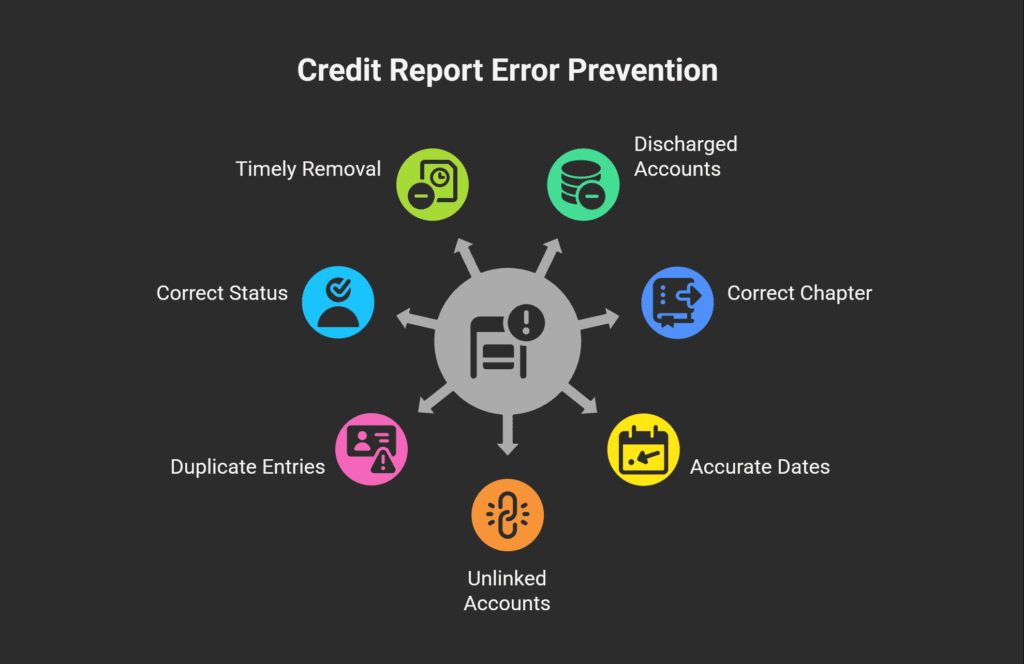
Bankruptcy entries are some of the most error-prone records on a credit report because the data passes through multiple parties before it reaches the bureau: the court, the trustee, and every creditor whose accounts were included in the filing.
Each handoff is an opportunity for the data to be entered late, entered incorrectly, or not updated at all after the discharge is granted. Knowing the most common errors means you know exactly what to look for when you pull your reports.
These are the seven most frequently occurring errors in bankruptcy entries on credit reports:
Client Dispute Manager Software scans every tradeline when you import your credit reports and flags all of these error types automatically. You do not have to identify each one manually before building your dispute.

Strong documentation is what turns a dispute letter into a successful outcome. Credit bureaus are required to investigate your dispute, but they investigate by contacting the source of the information and asking whether it is accurate.
The source will often verify what it has on file unless you give the bureau specific, documented proof of the error. The more precise your documentation, the harder it is for the bureau to simply verify the inaccurate entry and leave it unchanged.
For a bankruptcy entry dispute specifically, gather the following documents before writing a single word of your dispute letter:
| Document | What It Proves | Where to Get It |
|---|---|---|
| Bankruptcy Discharge Order | The discharge date and which debts were discharged | Court records or your bankruptcy attorney |
| Court Filing Docket | The filing date, the correct chapter, and the case number | PACER.gov, free to search, small fee per page to download |
| Schedule of Creditors From the Filing | Which accounts were and were not included in the bankruptcy | Court records or your bankruptcy attorney |
| Account Statements Showing $0 Balance Post-Discharge | Included accounts must not carry an outstanding balance after discharge | Contact the original creditor directly |
| Credit Report Copy With the Error Highlighted | Shows the specific inaccuracy you are disputing on each bureau's file | AnnualCreditReport.com, free annual pull from all three bureaus |
| Government-Issued Photo ID | Verifies your identity to the bureau | Driver's license, passport, or state-issued ID |
| Written Dispute Letter With FCRA Section 611 Citation | Formally states the error, requests the correction, and invokes your legal rights | Generated automatically by CDMS when you select the item to dispute |
Client Dispute Manager Software attaches your supporting documents to each bureau-specific dispute letter automatically when you upload them to the platform. You upload once; CDMS routes the correct documentation to each bureau.
Challenging a bankruptcy entry is a six-step process. Pull your credit reports from all three bureaus, identify the specific error in each bureau’s file, gather the documentation that proves the error, generate a bureau-specific dispute letter for each bureau reporting the error, submit each letter and track the 30-day investigation deadline, and follow up if a bureau fails to respond or responds incorrectly.
Client Dispute Manager Software automates steps three through six, including deadline tracking and follow-up letter generation when a bureau does not respond on time.
Follow these steps in order. Each one builds on the previous.

A dispute letter for a bankruptcy entry must include six elements to be effective. First, your full legal name and current mailing address, matching your ID exactly. Second, the specific item you are disputing, including the bureau’s account number or reference number for the entry.
Third, the factual basis for the dispute: what the entry currently says and what it should say instead. Fourth, the correction you are requesting. Fifth, a citation of your rights under FCRA Section 611. Sixth, a list of the documents you are enclosing as proof.
Client Dispute Manager Software generates dispute letters with all six elements pre-populated based on the specific error type you select. You review and submit.
The process inside Client Dispute Manager Software follows four steps. First, import your credit reports from all three bureaus. Second, review the errors flagged in your bankruptcy entry and confirm which ones to dispute.
Third, CDMS generates bureau-specific dispute letters with the correct FCRA language and attaches your uploaded supporting documents. Fourth, CDMS tracks the 30-day response deadline for each bureau and sends follow-up letters automatically when a deadline passes.
Every dispute round is logged in the client record, building a complete dispute history you can reference at any point.
Once you submit a dispute, the bureau has 30 days to investigate and respond.
The investigation involves the bureau contacting the source of the information typically the court records system or the creditors whose accounts are tied to the filing and asking whether the reported information is accurate.
Based on that investigation, the bureau must take one of three actions: remove the entry or correct it if the information cannot be verified, update the entry with accurate information if a specific detail is wrong, or verify the entry as accurate and leave it unchanged if the investigation supports the current reporting.
Client Dispute Manager Software logs each bureau response and flags the outcome for review.
You can submit a dispute to each bureau online or by certified mail. Certified mail is recommended for bankruptcy disputes because it creates a legal record of the submission date and delivery confirmation.
| Bureau | Online Dispute Portal | Mailing Address |
|---|---|---|
| Experian | experian.com/disputes | Experian, P.O. Box 4500, Allen, TX 75013 |
| Equifax | equifax.com/personal/credit-report-services | Equifax Information Services LLC, P.O. Box 740256, Atlanta, GA 30374 |
| TransUnion | transunion.com/credit-disputes | TransUnion LLC, Consumer Dispute Center, P.O. Box 2000, Chester, PA 19016 |
Each bureau investigates independently. A correction made at Experian after a successful dispute does not automatically update your Equifax or TransUnion file.
A bankruptcy entry error may appear differently across all three bureaus, and each one requires its own separate dispute letter, its own 30-day investigation window, and its own follow-up if the response is unsatisfactory.
Client Dispute Manager Software submits separate, bureau-specific letters to all three simultaneously and tracks each investigation timeline on a single dashboard. You do not have to manage three separate dispute processes manually.
If a bureau investigates your dispute and verifies an entry you have documented proof is wrong, you have two escalation options. The Consumer Financial Protection Bureau handles complaints about credit bureau conduct at consumerfinance.gov/complaint.
Filing a CFPB complaint creates a formal record and typically produces a faster response from the bureau because the bureau is required to respond to CFPB complaints within a set timeframe. The Federal Trade Commission handles complaints involving identity theft at reportfraud.ftc.gov
If your bankruptcy entry contains fraudulent accounts that were added as a result of identity theft, the FTC report becomes part of the supporting documentation for your dispute.

The most effective services for challenging bankruptcy entry errors automate bureau-specific letter generation, track 30-day investigation deadlines across all three bureaus simultaneously, and are built by CROA-compliant practitioners who understand the distinction between what can and cannot be challenged in a bankruptcy entry.
Paying a service company $79 to $149 per month for the same dispute process you can manage with software at a lower cost does not make the disputes more effective. What matters is the accuracy of the letters, the completeness of the documentation, and the consistency of the follow-up.
Client Dispute Manager Software was built by Mark Clayborne, a certified credit consultant and CROA practitioner with over a decade of experience in the credit repair industry.
The platform generates bankruptcy-specific dispute letters with correct FCRA citations, attaches supporting documents automatically, tracks bureau response deadlines across all three bureaus from a single dashboard, and monitors score changes tied to each dispute round.
It is designed for both consumers managing their own credit repair and credit repair professionals managing multiple client files.
When comparing options for disputing a bankruptcy entry, three paths are available:
| Option | Cost | Automation Level | CROA Compliant |
|---|---|---|---|
| DIY dispute letters | Free | None — you write, mail, and track every step manually | Yes |
| Credit repair service companies | $79 to $149 per month | Partial — letters often templated, tracking varies by service | Varies — verify before enrolling |
| CDMS Software — 30-day free trial | Low monthly fee | Full — letter generation, bureau tracking, deadline alerts, follow-ups | Yes — built by a certified CROA practitioner |
You cannot challenge an accurate, legally filed bankruptcy. You can dispute inaccurate details within the entry: wrong chapter, incorrect filing or discharge dates, discharged accounts still showing outstanding balances, accounts incorrectly tied to the filing, duplicate entries, and entries remaining past the 7-year limit for Chapter 13 or the 10-year limit for Chapter 7.
Submit a dispute to all three bureaus with certified court documentation proving the specific error. CDMS generates bankruptcy-specific dispute letters automatically.
In the context of a bankruptcy entry, the items that can be removed are inaccurate details, not the filing itself if it is accurate.
Removable errors include discharged accounts still reporting a balance, entries past the 7- or 10-year reporting limit, the wrong chapter listed, incorrect dates, duplicate entries, and accounts incorrectly tied to or excluded from the filing.
The bankruptcy itself, if accurately recorded, cannot be removed before the reporting limit expires.
For a bankruptcy entry dispute, gather the bankruptcy discharge order, the court filing docket showing the correct chapter and filing date, the schedule of creditors showing which accounts were included, account statements showing a $0 balance post-discharge for any accounts you are claiming were discharged, a copy of the credit report with the error highlighted, your government-issued photo ID, and a written dispute letter citing FCRA Section 611.
CDMS generates the dispute letter automatically and routes supporting documents to each bureau.
Pull your reports from all three bureaus at AnnualCreditReport.com. Identify the specific error in each bureau’s file. Gather documentation proving the inaccuracy. Submit a written dispute letter to each bureau reporting the error, citing the FCRA and the specific correction you are requesting.
The bureau has 30 days to investigate. If the information cannot be verified, it must be corrected or removed. CDMS automates letter generation, bureau tracking, and follow-up scheduling across all three bureaus simultaneously.
You have the right to dispute any inaccurate entry on your credit report at no cost. Bureaus have 30 days to investigate and respond.
You have the right to a free annual credit report from each bureau at AnnualCreditReport.com, to add a 100-word personal statement to your file, to know what is in your file, and to seek damages if a bureau or furnisher violates the FCRA.
These rights apply to every entry on your report, including bankruptcy entries.
Challenging a bankruptcy on your credit report takes effort, but the process is clear when you follow the right steps. You need to review your reports closely, identify inaccurate or incomplete data, and submit proper disputes backed by documentation. Credit bureaus must investigate, and if they cannot verify the information, they must remove or correct it.
Staying consistent with follow-ups and understanding your rights under federal law gives you a real advantage when dealing with negative items like bankruptcy.
If you want better results, focus on accuracy, timing, and organization. Track every dispute, keep records of responses, and use structured dispute methods when needed. Many people speed up this process by using tools that help manage dispute flows and documentation. With the right approach, you can take control of your credit report, correct errors, and move toward a stronger financial profile over time.

Mark Clayborne specializes in credit repair, starting and running credit repair businesses. He's passionate about helping businesses gain freedom from their 9-5 and live the life they really want. You can follow him on YouTube.

Experience our credit repair software, risk-free.