
How to Choose Credit Repair Software for Beginners (2026)
Written by March 30, 2026
Last updated on March 30, 2026

On this page
If you have never used credit repair software before, the options can feel overwhelming fast. Every platform claims to be the easiest, the most powerful, and the best value. But when you are just getting started, most of that marketing noise does not help you figure out the one thing you need to know: which platform will help you get results without making you feel lost.
This guide breaks it down simply. You will learn what beginners should look for, how to evaluate a platform before committing to it, how to check whether a provider is legitimate, and how to get started safely. Whether you are working on your own credit or just starting a credit repair business, this page gives you a clear path forward.
Beginners should look for credit repair software that is easy to navigate, includes step-by-step dispute guidance, offers a free trial long enough to test the full workflow, and is built with FCRA and CROA compliance in mind. The easiest credit repair software for beginners combines simple onboarding, automated dispute letter generation, and clear progress tracking so you can start acting without needing industry experience first.
What Should Beginners Look for in Credit Repair Software?

Beginners should prioritize ease of use, clear onboarding, automated dispute tools, and compliance-ready workflows. A platform that walks you through the process step by step is more valuable at the start than one loaded with advanced features you do not yet need. Look for software that explains what each step means and why it matters, not just what button to click next.
When you are new to credit repair, you do not need the most advanced platform on the market. You need one that gets you moving in the right direction quickly and does not leave you confused after the first login.
Here is what matters most for beginners:
- Simple Dashboard: The platform should show you exactly where each client or dispute stands without requiring you to dig through menus. If you cannot find what you are looking for within a few clicks, the software is too complicated for day-to-day use.
- Step-by-step Guidance: Good beginner software tells you what to do next at each stage of the dispute process. It should not assume you already know how to read a credit report, write a dispute letter, or track a bureau response.
- Automated Dispute Letters: Writing dispute letters from scratch takes time and increases the chance of errors. Look for software that generates letters automatically based on the type of negative item you are disputing.
- Clear Progress Tracking: You should be able to see at a glance which disputes are pending, which have been responded to, and what changed after each round. Confusion about where things stand is one of the most common frustrations for beginners.
- Responsive Support: When you get stuck, you need to be able to get help quickly. Look for platforms that offer live chat, email support, or a knowledge base that answers common questions clearly.
- Training Included: The best platforms for beginners include educational content that teaches you how credit repair actually works, not just how to use the software. That background knowledge makes you more effective with every client.
Start Today and Explore the Features Firsthand!
Evaluation Checklist: How to Evaluate Credit Repair Software as a Beginner
To evaluate credit repair software as a beginner, test the platform during its free trial by completing one full dispute workflow from start to finish. Check whether the interface is easy to navigate, whether letters are generated automatically, whether compliance tools are included, and whether support is available when you need it. A platform that is hard to use during the free trial will not get easier after you pay for it.
Before you commit to any credit repair platform, run it through this checklist. You can do most of this during a free trial:
| What to Check | What to Look For | Pass or Fail |
|---|---|---|
| Onboarding Process | Clear welcome steps, guided setup, no confusing jargon upfront | Can you get through setup in under 30 minutes? |
| Dashboard Clarity | All active clients or disputes visible at a glance | Can you find a client file in under 3 clicks? |
| Dispute Letter Generation | Letters created automatically based on item type | Does it write the letter for you or ask you to write it? |
| Bureau Response Tracking | System logs response dates and flags items past 30 days | Does it remind you when a response is overdue? |
| Training Resources | Video walkthroughs, written guides, or in-app tutorials | Is there content that explains the reason behind the process? |
| Compliance Tools | CROA contract templates, TSR workflow alignment | Does the platform mention compliance at all? |
| Support Access | Live chat, email, or phone support available | Can you get a real answer within 24 hours? |
| Free Trial Length | At least 7 days; 30 days is ideal for full evaluation | Is the trial long enough to test a real workflow? |
Choosing Credit Repair Software for Disputing Credit Report Errors
When choosing credit repair software specifically for disputing credit report errors, look for a platform that supports all three major credit bureaus, generates dispute letters based on the specific type of error, tracks each letter and response, and includes guidance on what to do when a bureau disputes your dispute.
The dispute management workflow is the core function of any credit repair tool and should be the first thing you test.
Not every negative item on a credit report qualifies for a dispute. The Fair Credit Reporting Act gives you the right to dispute information that is inaccurate, incomplete, or unverifiable. It does not give you the right to remove accurate, verifiable information just because it hurts your score.
Here is what good dispute-focused software does for beginners:
- Helps you identify which items on a credit report may be worth disputing
- Generates dispute letters tailored to the specific type of negative item
- Tracks the 30-day window the bureau has to respond under the FCRA
- Logs the outcome of each dispute round so you can decide on next steps
- Guides you on what to do if a bureau verifies an item you believe is wrong
Under the Fair Credit Reporting Act, you have the right to dispute inaccurate or incomplete information on your credit report at no cost. Credit bureaus must investigate your dispute within 30 days in most cases. If they cannot verify the information, they must remove it.
What software cannot do: no credit repair software can guarantee the removal of any specific item. If information is accurate and verifiable, it will not be removed through a dispute. Any platform that claims otherwise is not being honest about how the process works.
Start Today and Explore the Features Firsthand!
Credit Repair Software Recommended by Professionals

Credit repair professionals recommend software that combines strong automation with compliance infrastructure and ongoing education. For beginners, the most recommended platforms are those that include built-in training content alongside the dispute tools, so new users can learn the process as they work through it.
Client Dispute Manager Software is consistently recommended by credit repair professionals for its combination of accessible pricing, practitioner-built training, and compliance-ready workflows.
When credit repair professionals recommend a platform to beginners, they consistently point to the same set of criteria. It is not just about features. It is about whether the platform prepares you to do the work correctly.
The things professionals look for when recommending software to beginners:
- Does the platform teach you how credit repair works, not just how to use its buttons?
- Are the dispute workflows built around FCRA and CROA compliance?
- Is the training content created by someone who has actually run a credit repair business?
- Is there a free trial long enough to evaluate the platform properly?
- Is the pricing accessible for someone just getting started?
Client Dispute Manager Software: A Beginner-Friendly Credit Repair Solution

If you are new to credit repair, you need a system that removes guesswork and keeps you consistent. Client Dispute Manager Software is built for beginners and business owners who want a clear process from start to finish. It focuses on structure, automation, and simplicity, so you always know what to do next.
Instead of managing disputes manually, you follow a guided system that helps you move faster and stay organized. You do not need prior experience. The platform is designed to walk you through each step, from reviewing your credit report to sending and tracking disputes.
Key Features of Client Dispute Manager Software
Here are the features that make it effective for beginners:
- Automated Dispute Workflows: You follow a step-by-step process that tells you what to do next. This reduces confusion and keeps your disputes consistent.
- Pre-built Dispute Letter Templates: You get ready-to-use letters based on common dispute scenarios. This saves time and helps you avoid writing everything from scratch.
- Credit Report Integration: You can upload and review your credit report in one place. This makes it easier to identify negative items and take action quickly.
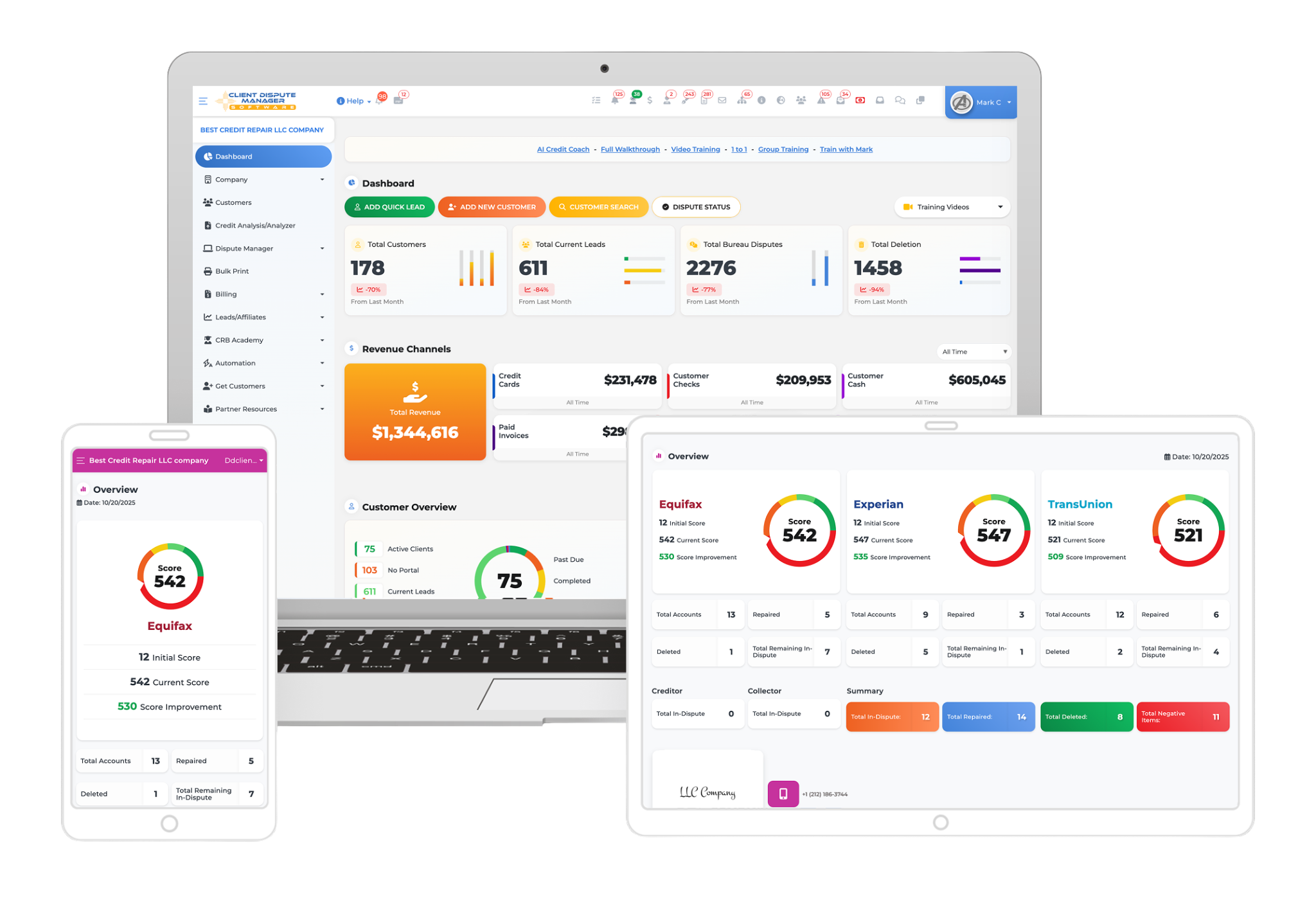
- Progress Tracking Dashboard: You see the status of every dispute in real time. This helps you stay organized and avoid missed follow-ups.
- Client Management System: If you are running a business, you can manage multiple clients from one dashboard. This keeps everything structured and easy to scale.
- Beginner-Friendly Interface: The platform is simple to use, even if you have no experience. You can start without a steep learning curve.
- Dispute History And Documentation: Every action is recorded, so you always have a clear record of what was sent and when.
Start Today and Explore the Features Firsthand!
How to Verify Legitimacy of Credit Repair Software Providers?
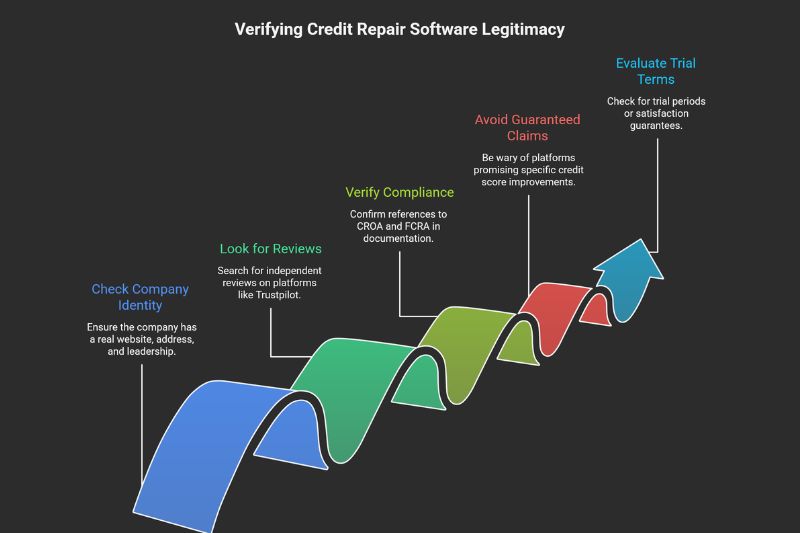
To verify the legitimacy of a credit repair software provider, check whether the company operates transparently with a real business address and team, look for reviews on independent platforms like Trustpilot or Capterra, confirm that the platform’s documentation references CROA and FCRA compliance, and check whether the founder or team has publicly verifiable credentials in the credit repair industry.
Avoid any platform that makes guaranteed outcome claims or asks for full payment before services are delivered.
Not every credit repair software company operates legitimately. Some platforms overpromise results, hide their pricing, or lack any connection to real credit repair expertise. Here is how to check before you commit:
- Check for a Real Company Identity: The company should have a real website, a verifiable business address, and identifiable leadership. If you cannot figure out who is behind the platform, that is a red flag.
- Look for Independent Reviews: Search the platform’s name on Trustpilot, Capterra, G2, or in credit repair industry forums. Focus on reviews from users who have similar needs to yours. Be cautious of platforms with no reviews or only reviews on their own website.
- Verify Compliance References: A legitimate credit repair software provider will reference CROA, FCRA, and TSR compliance in their documentation, terms of service, and training materials. If a platform never mentions federal law, that is a problem.
- Check for Guaranteed Outcome Claims: Under the Credit Repair Organizations Act, no credit repair company can legally guarantee specific credit score improvements or promise the removal of negative items. If a platform makes those claims, they are in violation of federal law. Walk away.
- Evaluate the Trial Terms: A legitimate platform offers a trial period or a satisfaction guarantee on the subscription fee. They should not require full upfront payment with no option to evaluate first.
The Credit Repair Organizations Act requires credit repair organizations to provide clients with a written contract, disclose their rights, and allow a three-day cancellation window. Legitimate software providers build these requirements into their platform workflows. If a platform’s documentation ignores CROA entirely, do not use it to run a credit repair business.
Where to Download Reputable Credit Repair Software Safely?

The safest way to access credit repair software is to go directly to the provider’s official website rather than downloading from third-party sites, app stores, or forums. Most modern credit repair platforms are web-based, meaning there is nothing to download. You log in through a browser. If a platform requires a desktop download, verify the source carefully before installing anything on your computer.
Most professional credit repair software runs in a web browser. That means you do not need to download or install anything. You create an account, log in, and access the full platform from any device with an internet connection.
Here is how to access reputable credit repair software safely:
- Always go directly to the official website of the platform you are evaluating
- Do not download credit repair tools from third-party websites, file-sharing platforms, or forums
- Be cautious of any site claiming to offer a free full version of paid software
- Check that the website uses HTTPS before entering any personal or client information
- Look for a clear privacy policy and terms of service before creating an account
Start Today and Explore the Features Firsthand!
Migrating from Another Credit Repair Platform
Migrating data between credit repair software platforms involves exporting your client files, dispute history, and documents from your current platform and importing or re-entering them into the new one. Most platforms do not have direct integration with each other, so migration typically requires some manual work.
Plan the transition carefully to avoid losing dispute history or missing active response deadlines during the switch.
If you are switching from one credit repair platform to another, here is what to plan for before you make the move:
- Export Everything First: Before canceling your current platform, export all client files, dispute letters, bureau responses, and progress notes. Store them securely outside the platform in case you need to reference them later.
- Document Active Disputes: Note every dispute that is currently in progress, including when each letter was sent and when a bureau response is due. These deadlines do not pause while you switch platforms.
- Re-enter Client Data Carefully: Most platforms do not have direct import compatibility with each other. You will likely need to re-enter client information, contact details, and dispute history manually or in batches.
- Test the New Platform Before Fully Committing: Use the free trial period to run one or two existing client files through the new platform before moving your entire client list over. That way you catch any workflow gaps before they affect active clients.
- Notify Clients If Needed: If the transition affects their portal access or reporting, let them know in advance so they are not surprised by a change in how they view their progress.
Frequently Asked Questions
What Are the Easiest Credit Repair Applications for Beginners?
The easiest credit repair software for beginners is one that includes guided onboarding, automated dispute letter generation, clear dashboard navigation, and built-in training content. The goal is to be able to complete your first dispute workflow without needing to research every step independently. Client Dispute Manager Software is designed with beginners in mind.
The training library from Mark Clayborne covers the entire credit repair process from the ground up, so you learn what you are doing as you do it. The 30-day free trial lets you test the full platform before paying anything.
Most User-Friendly Credit Repair Software for Non-Experts
The most user-friendly credit repair software for non-experts keeps the interface clean, uses plain language instead of industry jargon, and walks you through each step of the dispute process without assuming prior knowledge. The best platforms also include educational content that explains why each step matters, not just what to do next.
For non-experts, training quality is just as important as feature quality. A platform that teaches you as you work through it will produce better results than one that assumes you already know everything.
Credit Repair Software Recommended by Credit Counseling Professionals
Credit repair professionals and credit counselors typically recommend platforms that are built around compliance, include real training content, and have a verifiable track record. Client Dispute Manager is recommended by credit repair professionals due to its compliance-ready workflows, Mark Clayborne’s practitioner-built training library, and its transparent 30-day free trial with no credit card required.
When asking for recommendations in professional communities, look specifically for platforms with clear CROA and FCRA compliance documentation.
Where to Download Reputable Credit Repair Software Safely?
The safest way to access reputable credit repair software is to go directly to the provider’s official website. Most modern credit repair platforms are web-based, so there is nothing to download. You sign up online and access everything through your browser. Client Dispute Manager is a web-based platform available at clientdisputemanagersoftware.com.
Never download credit repair software from third-party sites or file-sharing platforms. Only access platforms through their official website.
Where Can I Download a Reputable Credit Repair Desktop Application?
Most reputable credit repair software platforms have moved to web-based access, which means you do not need a desktop application. Web-based platforms are accessible from any device, do not require installation, and are updated automatically by the provider.
If you encounter a platform offering a desktop download, verify the source by going directly to the official company website and downloading only from there. Client Dispute Manager is fully web-based and requires no download or installation.
Ready to Get Started
Choosing the right credit repair software as a beginner does not have to be complicated. Start with a platform that is easy to navigate, includes real training, and gives you a long enough free trial to evaluate it properly before committing to anything.

Mark Clayborne
Mark Clayborne specializes in credit repair, starting and running credit repair businesses. He's passionate about helping businesses gain freedom from their 9-5 and live the life they really want. You can follow him on YouTube.
Start Today and Explore the Features Firsthand!
Related Guides:
- How To Choose the Best Credit Repair Software (2026)
- Credit Repair Software Pricing: How Much Does It Cost?
- How to Choose the Best Credit Repair Software for Small Businesses?
- Is Credit Repair Software Legal? Compliance & Security Guide
- Credit Repair Software for Hard Inquiries, Medical Debt & More
- How to Use Credit Repair Software: Step-by-Step Guide
- How to Choose the Best Credit Repair Software for Professionals?
Client Dispute Manager
Free 30-Day Trial
Experience our credit repair software, risk-free.