

Credit repair software helps businesses and credit repair professionals organize client records, review imported credit report information, prepare correspondence, manage dispute workflows, store documents, track responses, and communicate with clients.
Some platforms also include credit repair CRM features for leads, tasks, appointments, billing, and client follow-up. Available features differ by platform. Software can support administrative work, but it cannot guarantee deletions, credit score increases, legal compliance, or other consumer outcomes.
Managing credit repair clients can involve intake records, agreements, report information, documents, correspondence, responses, follow-up dates, and progress updates.
Business software brings much of that information into one system. It does not decide whether information is inaccurate or promise what a bureau, creditor, or collector will do. This guide explains its role and limits.
What Is Credit Repair Software?
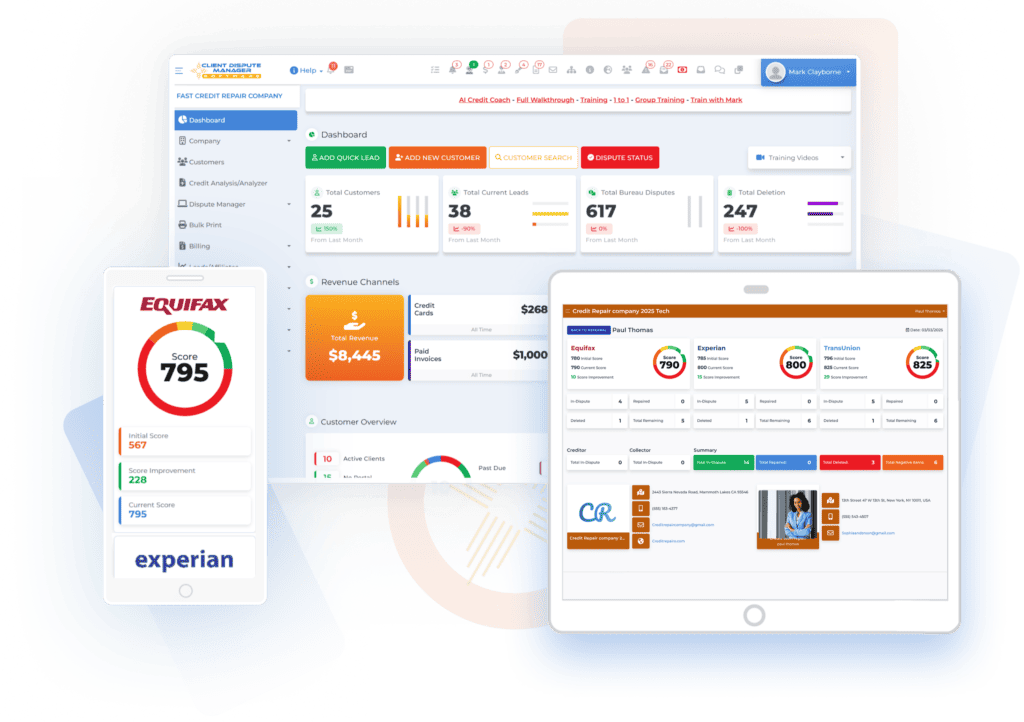
Credit repair software is a business or personal tool used to organize work related to credit report review and disputes. It may also be called credit dispute software when its main purpose is preparing and tracking disputes.
Business platforms may include client records, document storage, report imports, correspondence tools, workflow tracking, reminders, client portals, communications, and reporting. Personal and business software serve different users. Personal software usually helps one consumer organize information about their own reports.
Credit repair software for professionals is designed to manage separate records and workflows for multiple clients. It may also provide staff accounts, permissions, portals, and business reports. The software does not repair a credit file by itself. It gives the user tools for managing information and administrative steps.
How Does Credit Repair Software Work?
Most business platforms support a sequence that starts with client onboarding and continues through report review, correspondence, response tracking, and client updates. The details vary, but the following six steps show the general process.
Add Or Onboard a Client
The business creates a separate client record. Depending on the platform, the client may complete an online form, review service options, sign agreements, upload documents, and receive portal access.
The record can hold contact information, documents, notes, tasks, correspondence, and activity history.
Import or Enter Credit Report Information
Some platforms import report information from supported credit monitoring providers. Others accept certain files or require manual entry. The user may also be able to re-import information later to review changes.
A monitoring-service import is not necessarily a direct bureau connection. Ask the provider to identify the source and explain the method.
Review the Reported Information

Software may help organize accounts, balances, dates, payment history, personal information, and other report details. Some platforms also provide analysis tools that help users locate items for closer review.
A person should still verify the client, compare the source information, identify the specific problem, review supporting records, and decide whether a dispute is appropriate.
Prepare Correspondence
Credit repair software may provide letter templates, editing tools, client-information fields, recipient records, and printing or mailing connections. These tools can reduce repeated typing and keep correspondence attached to the correct client record.
Every letter should be reviewed. Confirm the consumer, account details, dispute reason, documents, recipient, and address. A template does not guarantee accuracy or legal sufficiency.
Track Dispute Activity and Responses
The platform may record correspondence dates, dispute rounds, recipients, responses, notes, and follow-up tasks. Reminders can help staff return to a client record at the appropriate time.
Do not assume the software receives responses directly. A business may need to add a response or re-import information through a supported service.
Update Clients and Maintain Records
Client portals, messages, email, text notifications, uploaded documents, and progress reports can help a business share supportable updates. Activity records also show what work has been completed inside the platform.
A progress update should distinguish administrative activity from a consumer outcome. It should not imply that a deletion, score increase, or other result is guaranteed.
What Does Credit Repair Software Do for a Business?

Features differ, but credit repair software for a business may help with:
- Client intake and onboarding
- Separate client records
- Agreements and
document storage - Credit report imports
- Notes, reminders, and tasks
- Dispute workflow tracking
- Letter preparation
- Response and follow-up records
- Client portals
- Email, text, or in-platform communication
- Staff access and permissions
- Progress and business reporting
- Connections with supported third-party services
These tools support client servicing. They do not determine whether every dispute is valid or control how another company investigates and responds. For a small business, the main value is having client information, documents, tasks, and correspondence in one place.
For a larger team, staff permissions, task assignments, activity histories, and reporting may become more important. Professional credit repair software should fit the way the business actually reviews files and serves clients. For a closer look at individual capabilities, see Credit Repair Software Features
Is Credit Repair Software the Same as a Credit Repair CRM?
Not exactly. A credit repair CRM focuses on the relationship and workflow around each lead or client. It may manage contact details, intake status, appointments, notes, tasks, messages, staff assignments, and account activity.
Credit repair software usually goes further by supporting report review, dispute correspondence, supporting documents, response tracking, and progress records. Many business platforms combine both functions, so the same system can act as a credit repair CRM and credit dispute software.
When comparing products, confirm whether “CRM” means only contact management or includes the credit repair workflow your team needs. Read more about using a credit repair CRM for leads and customers.
Is Credit Repair Software the Same as Credit Report Software?
No. Credit report software may focus on obtaining, displaying, monitoring, or analyzing credit report information. Credit repair software uses report information as part of a broader client and dispute-management process.
A credit repair platform may import data from a supported monitoring provider, but that does not automatically make it a credit reporting company or a direct bureau connection.
Ask where the information comes from, how it enters the system, whether a new import replaces or adds to existing records, and what staff must review manually.
What Can Credit Repair Software Automate?

Depending on the platform, software may automate or assist with client account creation, onboarding steps, reminders, template population, workflow status changes, routine notifications, report imports, and printing or mailing requests.
Ask what triggers each action, whether staff can review it first, and how to stop it. Automation should not remove accuracy checks or professional judgment.
What Should Not Be Fully Automated?
Human review should remain part of several important decisions:
- Verifying client information
- Reviewing credit report details
- Identifying the claimed inaccuracy
- Selecting a dispute reason
- Checking supporting documents
- Reviewing letters and recipients
- Interpreting responses
- Making legal decisions
Sending a large number of letters quickly does not make the information correct. A controlled process should require the user to review the facts and approve important actions.
Can Credit Repair Software Improve a Credit Score?
Credit repair software cannot guarantee a credit score increase. It can organize work involving information the consumer believes is inaccurate or incomplete.
Outcomes depend on the facts, records, investigation, reporting changes, and other factors. Scores may also change for reasons unrelated to a dispute.
Can Credit Repair Software Remove Negative Information?
Software cannot remove accurate negative information simply because it is negative. Consumers can dispute information they believe is inaccurate or incomplete, and credit reporting companies and furnishers have duties involving qualifying disputes.
The Consumer Financial Protection Bureau states that accurate negative information generally cannot be removed merely because it is negative.
The CFPB also warns consumers about companies that claim they can remove current, accurate negative information. Read the CFPB guidance on accurate negative information.
Does Credit Repair Software Make a Business Compliant?

No. Software may support recordkeeping and approved procedures, but it does not automatically make a credit repair business compliant. The business remains responsible for its advertising, representations, disclosures, contracts, cancellation rights, billing practices, dispute conduct, privacy practices, and applicable state requirements.
The federal Credit Repair Organizations Act prohibits untrue or misleading representations and includes requirements involving written contracts, disclosures, cancellation rights, and advance payment. Review the FTC’s CROA overview and seek legal advice for your situation when needed. Templates, disclosures, contracts, and workflow settings should not be treated as legal approval.
Personal Software Versus Business Credit Repair Software
| Area | Personal Software | Business Software |
|---|---|---|
| Intended User | One consumer | A business managing clients |
| Client Records | Usually one user | Separate records for multiple clients |
| Staff Access | Usually unavailable | May include staff accounts and permissions |
| Workflow Tools | Basic task support | Client and dispute workflows |
| Documents | Personal files | Documents separated by client |
| Communication | Limited | May include portals and notifications |
| Reporting | Personal progress | Client and business reports |
| Connections | Consumer services | Business and monitoring services |
Confirm the platform’s intended user before comparing features. Software designed for one consumer may not provide the controls a business needs.
Hypothetical Credit Repair Software Workflow
A business owner adds a client and stores the agreement and supporting documents in a separate record. The owner imports information from a supported monitoring provider and reviews the reported accounts.
After identifying a specific claimed inaccuracy, the owner checks the source information, prepares correspondence, verifies the content, and records the mailing date.
When a response arrives, the owner adds it to the client record, reviews what changed, and schedules the next appropriate task. The software organizes the record and workflow. The owner still makes the decisions and checks the accuracy of each step.
How Client Dispute Manager Supports the Workflow
Client Dispute Manager is business credit repair software. Its current public product information lists guided client onboarding, customer records, reminders, notes, tasks, report imports, credit audits, progress reports, client communication, business reporting, and client and affiliate portals.
Client Dispute Manager Software also lists AI, Metro 2, manual letter, and system dispute workflows. Users should review each letter and workflow choice against the client’s facts and supporting records.
Client Dispute Manager Software lists training videos, walkthroughs, help articles, in-app chat, support tickets, live group sessions, and a user community. It also lists SmartCredit, MyScoreIQ, IdentityIQ, Twilio, Authorize Net, Zapier, LetterStream, and MyFreeScoreNow. Connection types differ, so users should confirm the setup. These features can help organize business activity. They do not guarantee deletions, score increases, legal compliance, or other credit results.
Start Today and Explore the Features Firsthand!
What Credit Repair Software Does Not Do
Credit repair software does not:
- Guarantee deletions
- Guarantee credit score increases
- Remove accurate information automatically
- Decide that every negative item should be disputed
- Replace human review
- Replace legal advice
- Make a business compliant
- Guarantee business success
Understanding these limits helps a business use software for its proper purpose: organizing information, tasks, records, and communications.
What Should You Look for in Credit Repair Software?
Look for software that fits your client volume, staff structure, workflow, training needs, security requirements, and data-export needs. Confirm how report imports and third-party connections work.
Test the tasks your team completes most often. For a full comparison checklist, read How to Choose Credit Repair Software for Your Business.
Frequently Asked Questions

Who Uses Credit Repair Software?
Consumers may use personal software to organize their own information. Credit repair companies use business software to manage separate client records, documents, correspondence, tasks, communications, and reports. Confirm the intended user because personal and business platforms provide different controls.
Can Credit Repair Software Connect to Credit Monitoring Services?
Some platforms support imports or connections with named monitoring providers. The method varies. Ask whether the setup is direct, handled through another service, completed through a file, or performed manually. A monitoring connection should not be described as a direct bureau connection unless that relationship is confirmed.
Does Credit Repair Software Send Letters Automatically?
Some platforms can populate, print, or submit mailing requests for letters. The business should review each letter before it is sent. Confirm the client information, dispute reason, supporting records, recipient, and address. Automation does not guarantee accuracy or an outcome.
Is Credit Repair Software the Same as a Credit Repair Company?
No. Software is a tool. A credit repair company is the business providing services to consumers. The company remains responsible for its representations, contracts, billing practices, dispute conduct, recordkeeping, and legal obligations.
Choose Credit Repair Software That Fits Your Business
The right credit repair software should match how your business manages clients, reviews report information, prepares correspondence, assigns tasks, communicates with clients, and maintains records. Start with written requirements. Separate essential needs from optional features, then test the same workflow on every platform you consider.
Review staff permissions, security information, training, support, report imports, CRM functions, third-party connections, and data exports. Use the 100-point scorecard to compare your findings. Do not rely on feature counts or sales claims without seeing how each function works.
Credit repair software can help you manage administrative work, but it cannot guarantee deletions, credit score increases, legal compliance, or business results. Your team must still review client information, dispute reasons, supporting records, correspondence, and legal obligations.
Client Dispute Manager combines client management, dispute workflows, communication tools, reporting, training, and support for credit repair professionals. Start a 30-day free trial to test the platform with your business workflow. No credit card is required under the current offer. Confirm the terms before publication.

Mark Clayborne
Mark Clayborne specializes in credit repair, starting and running credit repair businesses. He's passionate about helping businesses gain freedom from their 9-5 and live the life they really want. You can follow him on YouTube.
Start Today and Explore the Features Firsthand!
Below Is More Content For Your Review:
