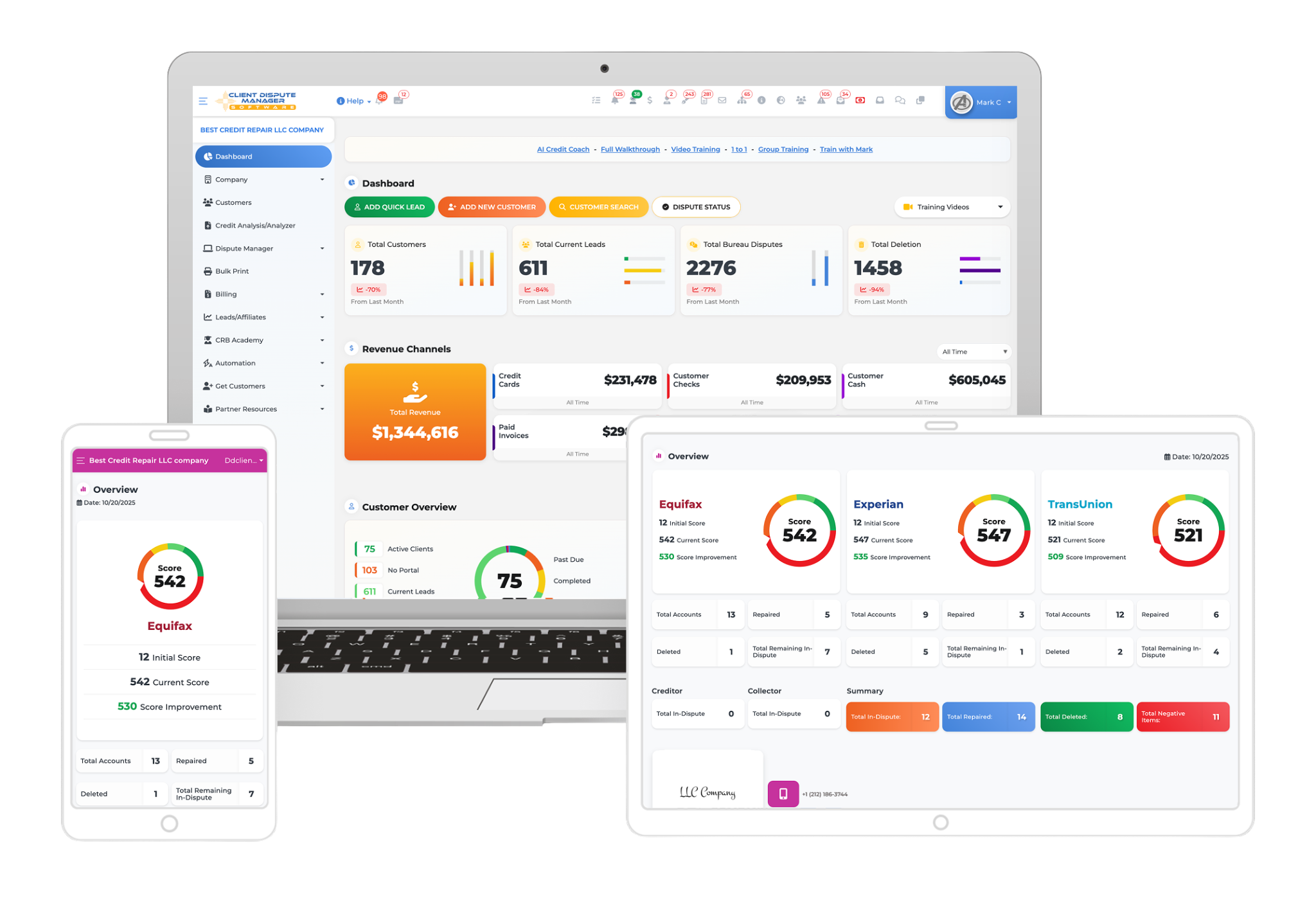

Choosing credit repair software starts with understanding your client volume, dispute workflow, document needs, staff access, and training requirements. The right credit repair software for your business should handle the work you complete often, give staff clear controls, and let you retrieve your records when needed.
Verify each important feature during a demonstration or trial. Software can assist with administrative work, but it cannot guarantee deletions, score increases, legal compliance, or other credit outcomes.
This guide explains how small businesses and credit repair professionals can compare platforms. It includes a 100-point scorecard you can use during a product demonstration or trial.
How Should You Choose Credit Repair Software?

Choose credit repair software by first documenting your client workflow. Then test the platform’s client records, report-import process, dispute tools, staff permissions, communications, security information, training, support, and data exports. Score each platform against the same requirements.
Do not choose based only on the number of advertised features or promises about credit outcomes.
Start With Your Credit Repair Business Needs
The right credit repair software should fit the way your business operates. Start by documenting your current process before comparing platforms.
Ask these questions:
- How many clients do you manage now?
- How many people need access to the platform?
- How do new clients complete forms and agreements?
- Where do you store client documents?
- How do you prepare and review correspondence?
- How do you track responses and follow-up dates?
- How do clients receive updates?
- What reports do you need for clients and internal review?
A new business owner may need guided setup, training, and clear workflows. An established company may care more about staff permissions, imports, reporting, connections, and managing more client records. Define those needs before viewing a demonstration.
Separate essential requirements from optional preferences. If a platform fails an essential requirement, a longer feature list should not change your decision.
Business Software Versus Personal Credit Repair Software
Credit repair software for professionals should manage separate records for multiple clients. It may also include staff accounts, permissions, portals, task assignment, business reports, and activity histories.
Personal credit repair software usually serves one consumer working on their own reports. It may lack the access controls, record separation, communications, and reporting a business needs. Confirm the intended user before comparing prices, plans, or features.
What Features Should Credit Repair Software Have?

Business-focused credit repair software should help organize client records, documents, dispute workflows, communications, tasks, and reporting. The exact tools vary by platform, so confirm how each feature works instead of relying on its name.
- Client Management: The software should give each client a separate record. That record may contain contact information, documents, notes, correspondence, task history, and account activity. Search and filtering tools also matter when the number of clients grows.
- Dispute Workflow Tools: Dispute workflow tools can help organize rounds, correspondence, supporting documents, responses, and follow-up dates. Some platforms also provide letter templates or tools that populate client information into a document. These tools do not determine whether a dispute is appropriate. A person should still verify the consumer’s information, review the reported item, select an accurate reason, and check every letter before it is sent. Software should support a careful process, not replace review.
- Document Management: Credit repair businesses may handle agreements, disclosures, identification records, credit reports, correspondence, responses, and supporting documents. Review how the platform stores these files and how quickly authorized users can find them.
- Credit Report Tools: Some platforms can import information from supported credit report or monitoring services. Others require manual entry or file uploads. Ask the provider to show the exact process and name the supported services. Do not assume that a credit report import means the software connects directly with a credit bureau. An import from a monitoring provider, a file upload, and a direct technical connection are different arrangements.
- Activity and Progress Tracking: Activity tracking can show completed tasks, correspondence dates, responses, re-imports, and other changes in a client record. This can help a business explain what work has been completed and what needs attention next. Tracking activity is not the same as promising a credit result. Reports should present supportable information without implying that a deletion or score increase is guaranteed.
- Communication Tools: Communication features may include portals, secure messages, email, text messages, or push notifications. Confirm which services require a separate account or provider.
- CRM and Lead Management: A credit repair CRM may track leads, intake stages, appointments, notes, tasks, staff assignments, and client messages. Some platforms combine CRM functions with report review and dispute workflows. Others provide only contact management.
Ask the provider to show how a lead becomes a client and which information carries into the client record. If lead management matters to your business, test that process from start to finish. For a closer review, read the guide to credit repair CRM tools for leads and customers
Can the Software Manage Multiple Client Accounts?
Business-focused software should keep each client’s records, documents, correspondence, and activity separate. It should also help authorized users find overdue tasks, upcoming follow-ups, and recent responses.
Consider a hypothetical business managing 20 clients. Each client may have intake documents, correspondence, dispute activity, responses, notes, and follow-up dates. Tracking that information across email, spreadsheets, and separate folders can create gaps. A centralized platform can make the administrative record easier to review, but the owner still needs clear procedures and staff accountability.
What Can Credit Repair Software Automate?
Credit repair software can automate or assist with certain administrative tasks. Depending on the platform, these may include:
- Client onboarding steps
- Task reminders
- Workflow status changes
- Template population
- Follow-up scheduling
- Routine notifications
- Report imports
- Document printing or mailing requests
Automation still needs limits. A person should review client information, dispute reasons, letter content, supporting records, and recipient details. A fast automated process is not useful if it sends inaccurate, irrelevant, or unsupported information.
Ask whether each automated action requires approval, creates an activity record, and can be stopped. This matters when several staff members work in the same account.
Does the Software Provide Training and Support?

Training and support can matter as much as the software itself. A platform may have suitable tools but still be difficult to adopt without clear instruction.
Review the available onboarding sessions, videos, written tutorials, help articles, live training, chat, tickets, and community support. Ask whether training is included, whether staff members can participate, and how users learn about product changes.
What Security Features Should You Review?
Credit repair businesses handle sensitive consumer and business information. Ask specific security questions instead of accepting a general statement that a platform is secure.
Review these areas:
- Separate accounts for staff members
- Role and permission controls
- Password and sign-in protections
- Protection for stored and transmitted information
- Backup and recovery practices
- Procedures for removing former staff access
- Data export options
- Incident reporting and response procedures
Request written information when a security control affects your decision. Your devices, passwords, staff practices, and document procedures also affect information security.
Can Software Make a Credit Repair Business Compliant?
No. Software can support recordkeeping and business procedures, but it cannot make a credit repair business compliant simply through its use.
The business remains responsible for its representations, contracts, disclosures, billing practices, dispute conduct, privacy practices, and other legal duties. The federal Credit Repair Organizations Act prohibits untrue or misleading representations and includes requirements involving written contracts, disclosures, cancellation rights, and advance payment. Review the FTC’s CROA overview and obtain legal advice for your business and state when needed.
Consumers can dispute inaccurate information themselves at no cost. The Consumer Financial Protection Bureau also warns that accurate negative information generally cannot be removed simply because it is negative. Read the CFPB guidance on accurate negative information before making claims about disputes or removals.
When evaluating software, look for tools that help you maintain records and follow your approved procedures. Do not treat templates, contracts, disclosures, or workflow settings as legal approval.
Credit Repair Software Comparison Checklist

Use this table when reviewing a demonstration or trial:
| Area | What to Verify |
|---|---|
| Intended User | Built for a business, a team, or personal use |
| Client Management | Separate records, notes, documents, activity, and search |
| Dispute Workflow | Rounds, correspondence, responses, and follow-up tracking |
| Letter Tools | Customization, review controls, and export options |
| Report Tools | Supported providers, import method, and re-import process |
| Staff Access | Separate accounts, roles, and permission controls |
| Communication | Portal, email, text, push, or secure messaging options |
| Training | Walkthroughs, tutorials, live sessions, and staff resources |
| Support | Available channels, hours, and response process |
| Security | Written controls, access removal, backup, and incident process |
| Connections | Direct, third-party, import, export, or manual |
| Data Access | Export format, cancellation process, and migration help |
Use a 100-Point Software Scorecard
Use the same scoring method for every platform. Adjust the weights before you start if one area matters more to your business.
| Decision Area | Points | What Earns a Higher Score |
|---|---|---|
| Client and Dispute Workflow | 25 | The platform supports your common tasks with clear review controls |
| Client, CRM, and Staff Management | 20 | Records stay separate and staff access can be assigned and removed |
| Security and Data Handling | 20 | The provider answers security questions and provides usable exports |
| Training and Support | 15 | Your team can access suitable instruction and support channels |
| Reports and Connections | 10 | Imports, reports, and third-party connections work as described |
| Trial and Exit Process | 10 | You can test key tasks and understand cancellation and migration |
| Total | 100 | Compare the final score with your essential requirements |
How Client Dispute Manager Software Fits Into a Credit Repair Workflow?
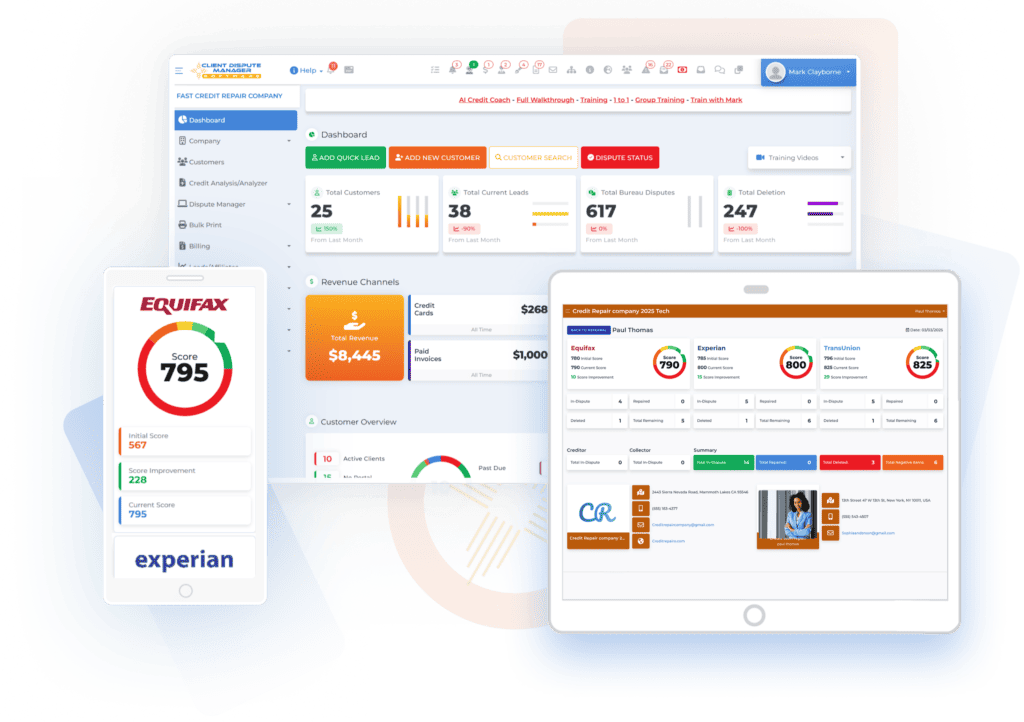
Client Dispute Manager Software is built for credit repair businesses. Its current public product information lists client onboarding, customer records, reminders, notes, tasks, report imports, dispute workflows, letters, client portals, progress reports, business reporting, and communication tools. The site also lists integrations with services such as SmartCredit, MyScoreIQ, IdentityIQ, Twilio, Authorize.Net, Zapier, LetterStream, and MyFreeScoreNow.
Client Dispute Manager Software also provides training videos, walkthroughs, help articles, in-app chat, support tickets, live group sessions, and a user community.
These tools can help organize business activity, but they do not guarantee a deletion, score increase, or other credit result. CDMS also does not replace the business owner’s legal responsibilities or the need to review each client’s information and correspondence.
If you are still preparing to operate, read the guide to starting a credit repair business. For dispute boundaries, review what you can and cannot dispute on a credit report.
Start Today and Explore the Features Firsthand!
Final Questions to Ask Before Choosing
Before making a decision, ask:
- Does the platform fit the way I manage clients now?
- Can I control staff access?
- Can I export my records in a usable format?
- Are the features I need active today?
- What training and support are included?
- Can I test the workflow before choosing?
- Does the provider explain its security practices?
- Which steps still require human review?
Frequently Asked Questions

What Is the Difference Between Personal and Business Credit Repair Software?
Personal credit repair software is designed for one consumer managing information from their own credit reports. It may provide report monitoring, educational resources, dispute templates, reminders, and progress tracking for that individual. It usually does not need to separate records for several clients or control access for a team.
Business credit repair software is designed for a company serving multiple clients. It may include separate client records, staff accounts, role-based permissions, portals, document storage, dispute workflows, task assignment, communication tools, activity histories, and business reports. Before choosing a platform, confirm who it is built for. Personal software may lack the record separation, staff controls, and reporting that a credit repair business needs.
Can I Move My Data to Another Credit Repair Platform?
Possibly, but the process depends on what the current platform can export and what the new platform can import. Ask for a written list of available export formats. Confirm whether the export includes client contact details, documents, notes, tasks, correspondence, dispute history, report information, activity records, and communication history.
Test a sample export before cancelling the current service. Check whether files keep clear names, client records remain separate, and dates and notes are readable. Ask the new provider what it can import automatically and what your staff must move manually.
Keep an authorized backup based on your recordkeeping and privacy procedures. Do not assume that every item shown in one platform will transfer to another.
Should Each Staff Member Have a Separate Software Account?
Yes, each staff member should generally have a separate account. Shared logins make it harder to control access, identify who completed an action, investigate mistakes, and remove one person’s access without affecting the rest of the team.
Check whether the software provides individual accounts, role-based permissions, activity records, sign-in protections, and a clear process for disabling access. Give each person only the access needed for their work. Review permissions when job duties change and remove access promptly when someone leaves. Your internal password, device, and record-handling procedures still matter, even when the platform provides staff controls.
What Should I Test During a Software Demonstration?
Test the same everyday tasks in every demonstration. Add a sample client, complete an intake step, upload a document, import or enter sample report information, create a task, review a dispute workflow, prepare a sample letter, locate a message, and inspect the activity history. Ask the provider to show which steps require staff review.
Also test staff permissions, client search, reporting, support access, and data exports. Ask what happens when an import or third-party connection fails. Use fictional or approved sample information rather than real consumer data unless the provider confirms that the test process is suitable. Record the results in your comparison scorecard so sales presentations do not replace evidence from the product itself.
What Is the Best Credit Repair Software for a Small Business?
The best credit repair software for a small business is the platform that meets its essential requirements without making routine work harder. The right choice depends on client volume, staff structure, intake process, report source, dispute workflow, communication needs, training, support, security information, third-party connections, and data exports.
Write your requirements before comparing platforms. Mark each one as essential or optional. Then test the same client, document, task, letter, communication, and export steps in every demonstration or trial. A longer feature list does not make a platform a better fit. The software should support careful review and recordkeeping, but it cannot guarantee deletions, credit score increases, compliance, or business results.
Choose Software Based on Your Actual Workflow
Choosing credit repair software starts with your business needs. Review how each platform manages client records, documents, dispute activity, staff access, communications, training, security, and data exports. Verify every feature and connection that affects your decision. Use the same test tasks and scorecard for each option.
Software can help organize administrative work, but it cannot guarantee removals, score increases, legal compliance, or other outcomes. Your procedures, reviews, representations, and legal duties still matter.
Client Dispute Manager provides software, training, support, and business tools for credit repair companies. Start a 30-day free trial to test how the platform fits your workflow. No credit card is required according to CDM’s current offer page. Confirm the current terms before publication.

Mark Clayborne
Mark Clayborne specializes in credit repair, starting and running credit repair businesses. He's passionate about helping businesses gain freedom from their 9-5 and live the life they really want. You can follow him on YouTube.
Start Today and Explore the Features Firsthand!
Below Is More Content For Your Review: