

Credit repair software can automate or assist with client onboarding, reminders, template population, status updates, routine messages, report imports, document requests, and mailing steps. A person should still verify client information, identify each claimed inaccuracy, review supporting records, approve correspondence, interpret responses, and choose the next action. Every automated action should be recorded and easy to stop or correct.
The goal is to reduce repeated administrative work while keeping people in control of facts, letters, records, and client communication. A useful system flags work that needs attention and keeps an activity history.
What Is Credit Repair Automation?
Credit repair automation uses software rules, templates, reminders, and connected workflow steps to complete routine tasks. For example, a completed intake form might create a client record, request documents, assign a task, and set a follow-up date.
That differs from a fully autonomous dispute process. Software can move information and prepare work, but it cannot confirm every claim or decide that every item should be disputed. Before using a feature, find out what starts it, who approves the result, and how staff can stop it.
What Can Software Automate, and What Needs Human Review?

Software works best on repeated tasks with clear rules. Depending on the platform, those tasks may include:
- Creating a client account from an approved intake form
- Sending onboarding reminders and document requests
- Assigning tasks and due dates to staff
- Filling approved templates with stored client information
- Updating a workflow stage after a recorded action
- Sending routine status notices
- Importing supported credit report data
- Preparing print or mailing requests
- Recording activity for later review
- Producing operational reports for the business
Human review is still needed wherever facts, context, or judgment matter. A staff member should confirm the correct consumer and account, identify the exact information the client says is inaccurate, compare the report with available records, and review what can and cannot be disputed. Someone should also check the letter, recipient, address, attachments, and supporting facts before it is sent.
Staff must also read responses, update the record, and decide what comes next. Legal questions, complaints, suspected identity theft, and unusual records may call for qualified legal guidance. Software should not replace factual review or professional judgment.
How Does an Automate Credit Dispute Workflow Work?
A controlled workflow gives routine actions a set order and places approval points before important steps. One possible process looks like this:
- Create the client record.
- Complete the approved onboarding steps.
- Import or enter the credit report information.
- Review the claimed inaccuracy with the client.
- Attach relevant supporting records.
- Prepare a draft letter from an approved template.
- Require a staff member to review and approve the draft.
- Submit a printing or mailing request.
- Record the action and date in the client history.
- Schedule a follow-up task.
- Add and review any response received.
- Decide the next appropriate action.
Consider a fictional client who says an account balance is incorrect. The software imports supported report data and places the account in a review queue. A staff member compares it with the client’s records. The system fills a letter template and creates an approval task. After review, the letter can move to mailing. The system records the date and sets a reminder, but it does not assume a result.
This setup keeps automation focused on movement, reminders, and records. Facts and decisions stay with the people responsible for the file.
How Should You Set Up and Review Letter Templates?

Customizable dispute letter templates can save time, but they should remain starting documents. Before a template is used, check its purpose, required fields, optional sections, and approval rule. Limit editing rights to staff who need them, and keep a record when an approved template changes.
For each draft, confirm the client’s name and address, account details, claimed inaccuracy, supporting facts, enclosed records, recipient, and mailing address. Remove unused fields and instructions. Read the finished letter as a complete document instead of trusting that every merge field worked.
Avoid sending generic mass correspondence that does not reflect the client’s actual situation. A polished template cannot make a false, incomplete, or unsupported claim accurate. It also cannot decide whether a dispute is appropriate. That decision depends on the facts in the client’s file.
How Can Report Analysis Support Human Review?
Credit repair software with built-in report analysis may organize account names, dates, balances, statuses, and changes between imported reports. This can make a large report easier to review and help staff find records that need attention.
Treat the analysis as a review aid, not a final finding. Confirm the report source, import method, consumer identity, and current reporting period. If the software accepts data from a credit monitoring provider, describe it as a supported provider import, not a direct connection to a credit bureau.
When a later report is imported, check whether the system preserves the earlier record, identifies changes, and requires review before the next task begins.
Can AI Help With Credit Repair Automation?

AI credit repair software may help organize report information, suggest a draft, summarize a response, or identify fields that need review. It can reduce reading and preparation time when its output is checked carefully.
AI can also misunderstand a record, omit context, or produce wording that sounds certain when the source is unclear. Do not send AI-generated correspondence without human review. Staff should compare every important statement with the client’s records and remove unsupported claims.
The platform should also explain how AI features handle client information, who can access the output, and whether users can turn the feature off.
Can Software Make a Business Compliant and Secure?
No. Software can support documented procedures and access controls, but it cannot make a credit repair business compliant by itself. Business owners remain responsible for their offers, contracts, disclosures, fees, advertising, record handling, and required credit repair legal steps.
The Credit Repair Organizations Act prohibits misleading representations, requires written contracts and disclosures, gives consumers cancellation rights, and restricts advance payment before promised services are fully performed. Other federal and state rules may also apply. A business should get advice from a qualified attorney about its own services and location.
Security also depends on configuration and use. Review individual staff accounts, permissions, activity records, multi-factor authentication, session controls, encryption, backups, retention settings, vendor access, and access removal. Ask how incidents are reported and data is exported or deleted.
Do not use automation to make claims the evidence does not support. The CFPB explains that consumers may dispute errors, but accurate negative information generally cannot be removed simply because it is unfavorable.
What Should You Test During a Software Demonstration?
Use fictional information during a demonstration. Run the same small workflow in every system and record each result.
| Test | What to Verify |
|---|---|
| Client Setup | Required fields, consent records, and duplicate handling |
| Report Import | Supported sources, field accuracy, and error handling |
| Letter Draft | Merge fields, editing rights, attachments, and approval |
| Workflow Rule | Trigger, assigned task, due date, and stop control |
| Staff Access | Separate accounts, permissions, and activity history |
| Response Review | Storage, notes, follow-up, and prior record retention |
| Data Export | Included records, file format, timing, and cost |
How Client Dispute Manager Software Supports a Controlled Workflow?
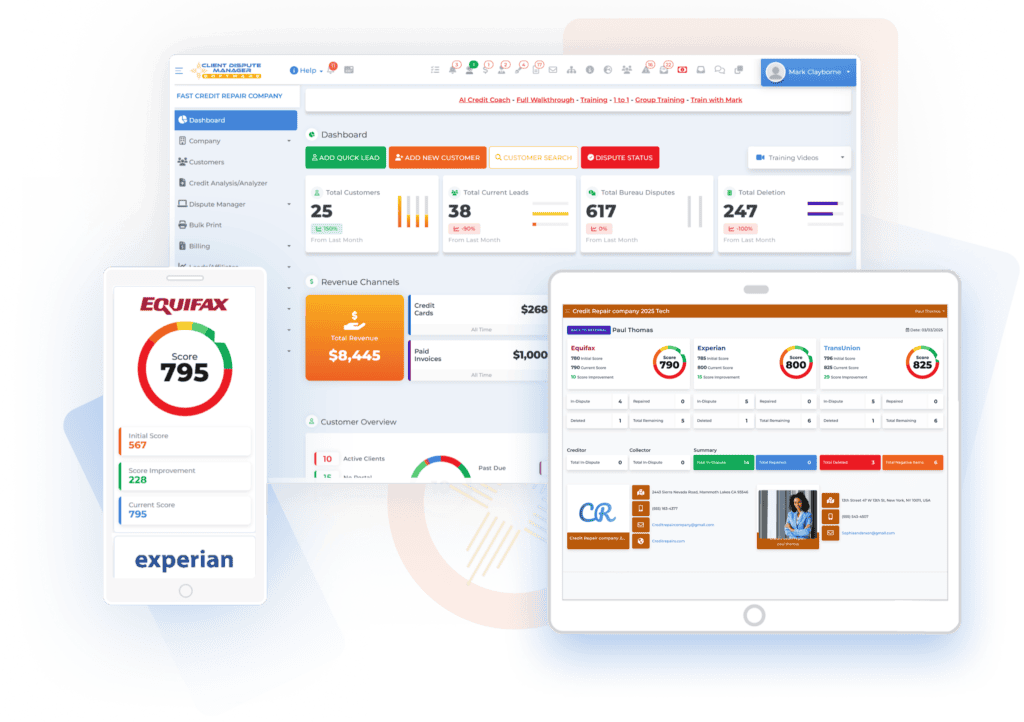
Client Dispute Manager brings client records, tasks, notes, documents, report imports, dispute workflows, letters, communication, and progress records into one system. Its current public feature information describes guided onboarding, supported credit report imports, report analysis, manual and assisted dispute workflows, client and affiliate portals, reminders, business reports, training videos, help articles, and support channels.
Those features can organize repeated steps, but staff still need to verify imported information, review each draft, check recipients and attachments, and handle responses. The software does not promise deletions, credit score changes, legal compliance, or business results.
Businesses comparing automated dispute features should test Client Dispute Manager with the same fictional workflow used for any other system. Review current features and terms on the Client Dispute Manager website before making a decision.
Start Today and Explore the Features Firsthand!
Common Mistakes and Setup Checklist

Common mistakes include automating an unclear process, giving every user full access, sending unreviewed templates, using stale report data, and creating rules that staff cannot trace.
Before activation, check that:
- Each automation has a clear trigger, owner, and stop control.
- Approval is required before correspondence is sent.
- Staff accounts match each person’s duties.
- Templates use current wording and valid addresses.
- Client records show source documents and activity dates.
- Exceptions have a written review path.
- Staff know how to correct errors and record the change.
- A sample workflow has been tested with fictional data.
Start with one repeated process. Test it, review the history, correct weak points, and then add another.
Frequently Asked Questions
Can Credit Repair Software Send Dispute Letters Automatically?
Some platforms can fill templates, create print requests, or move approved letters into a mailing process. The exact feature depends on the software and connected service. A person should review the client details, disputed information, recipient, address, evidence, and final wording before sending. Automatic delivery does not prove that a letter is accurate or appropriate.
What Credit Repair Tasks Should Not Be Fully Automated?
Do not fully automate decisions about whether information is inaccurate, which reason applies, whether evidence supports a claim, or what a response means. Complaints, legal questions, identity theft matters, and unusual records also need careful human attention.
Software can organize the file and prepare a task, but a qualified person should make the decision.
Can Software Make a Credit Repair Business Compliant?
No. Software may store contracts, disclosures, activity history, and access records, but compliance depends on the business’s conduct. Owners remain responsible for advertising, fees, agreements, cancellation rights, services, and state requirements. Have qualified legal counsel review the business model, documents, and procedures.
Do not treat a software setting as legal advice.
Can Automated Credit Repair Software Guarantee Results?
No. A platform cannot guarantee deletions, credit score increases, or a particular response. Results depend on the facts, the records supplied, and the investigation. Accurate negative information generally cannot be removed merely because it is harmful.
Be cautious of any product or service that promises a certain outcome or a fixed improvement.
Put One Controlled Workflow Into Practice
Begin by mapping one repeated task from intake to follow-up. Mark each automated step, each required approval, and the person responsible for exceptions. Then test the full process with fictional data and inspect the activity history.
If Client Dispute Manager Software fits your requirements, you can review its current 30-day free trial. The public offer states that no credit card is required, but confirm the current terms before publication or signup. The right setup should reduce repeated work without removing the human review that responsible dispute handling requires.

Mark Clayborne
Mark Clayborne specializes in credit repair, starting and running credit repair businesses. He's passionate about helping businesses gain freedom from their 9-5 and live the life they really want. You can follow him on YouTube.
Start Today and Explore the Features Firsthand!
Below Is More Content For Your Review:
