

Metro 2 credit reporting is the standardized format used by lenders and data furnishers to report credit account information to credit bureaus such as Equifax, Experian, and TransUnion. It defines how balances, payment history, account status, and compliance details are furnished and reviewed. Credit bureaus rely on Metro 2 data to maintain accuracy and consistency in consumer credit reports under the Fair Credit Reporting Act (FCRA).
Imagine filing a dispute and watching that inaccurate late payment get corrected on your credit report not temporarily, but permanently. Picture getting real results instead of vague “verified” responses that change nothing.
Right now, you’re probably stuck in the frustration cycle: you dispute an error, wait weeks for a response, and get the same account verified again with zero explanation. You’re not doing anything wrong traditional credit bureau dispute procedures are built to favor quick verification over thorough investigation. But here’s what most people don’t realize: metro 2 credit repair disputes work on an entirely different level.
Metro 2 is the standardized reporting format that creditors use to send your account data to credit bureaus. When you use the metro 2 dispute method, you’re targeting specific data field errors in this format like incorrect payment codes, wrong balances, or invalid dates forcing furnishers to validate their reporting at a technical level instead of just confirming an account exists.
In this article, you’ll discover nine powerful metro 2 credit reporting disputes techniques that shift the burden of proof where it belongs: on the companies reporting your information.
Every expert was once a beginner, and these strategies will give you the precision and confidence to dispute like you know exactly what you’re doing because you will.
Let’s transform your approach to credit report disputes using metro 2 standards.
Key Takeaways:
- Metro 2 disputes focus on specific data fields, not the entire account. You challenge payment codes, balances, dates, and status fields instead of accepting vague “verified” responses.
- Traditional credit bureau disputes favor quick confirmation, not accuracy. Metro 2 disputes raise the burden of proof by forcing furnishers to validate exact reporting details under FCRA Section 623.
- Many negative items remain on credit reports due to reporting errors. Common issues include wrong late payment codes, inflated balances, incorrect dates of first delinquency, and conflicting account statuses.
- Field-level Metro 2 disputes work best when sent directly to the furnisher. You target the company supplying the data, not just the credit bureau acting as a messenger.
- Tracking Metro 2 disputes across multiple accounts requires documentation and timelines. Using a centralized system helps you monitor responses, support compliance, and stay organized.
What Is Metro 2 Credit Reporting?
Metro 2 credit reporting is the industry-standard data specification developed to ensure credit information is reported in a consistent, structured, and reviewable format. It establishes uniform guidelines for how creditors and data furnishers submit account details to credit bureaus, reducing ambiguity and interpretation errors.
Unlike informal or narrative reporting, Metro 2 uses predefined fields, codes, and formats to describe account status, payment behavior, balances, and compliance conditions. This standardization allows credit bureaus to process large volumes of data efficiently while maintaining accuracy and regulatory alignment.
Metro 2 reporting plays a central role in how credit information is evaluated, stored, and reflected on consumer credit reports, making it a foundational component of modern credit reporting systems.
How Does Metro 2 Reporting Work?
Metro 2 reporting works through a structured monthly data-furnishing process between creditors, data furnishers, and credit bureaus. Lenders submit credit account updates using the Metro 2 format, which specifies how each data element must be coded, labeled, and interpreted.
Once submitted, credit bureaus review the furnished data for formatting consistency and internal validation before integrating it into individual credit files. The process ensures that reported information aligns with standardized reporting rules and reflects current account activity.
Because Metro 2 reporting follows uniform specifications, it allows credit bureaus to compare, update, and maintain credit data reliably across millions of consumer accounts, supporting accuracy and compliance with federal credit reporting requirements.
Why Traditional Credit Bureau Dispute Procedures Keep Failing You?

Before we dive into the nine techniques, let’s address why your previous disputes probably didn’t work and clear up some misconceptions about the credit dispute process.
- Misconception #1: Credit bureaus thoroughly investigate every dispute. The truth is, bureaus act as middlemen. When you file a dispute with Equifax, Experian, or TransUnion using traditional credit bureau dispute procedures, they forward it to the furnisher (the company reporting the information) and typically accept whatever response comes back. That’s why you get “verified” results so quickly often within 5-10 business days. Real investigation takes longer.
- Misconception #2: “Verified” means the information is accurate. “Verified” usually just means the furnisher confirmed the account exists and they’re reporting it. They’re not required to prove every data field is correct unless you specifically challenge those fields. That’s the power of field-level Metro 2 disputes you’re forcing validation of specific data elements, not just account-level confirmation.
- The Metro 2 Difference: When you cite specific metro 2 credit reporting standards in your dispute, you’re raising the investigation burden. Furnishers must check their records against the exact data fields they reported under the Fair Credit Reporting Act. Missing documentation, conflicting dates, or incorrect codes become clear violations not just your word against theirs.
Now let’s get into the nine techniques that put you in control of the metro 2 dispute process.
Technique #1: Metro 2 Payment History Disputes
Your credit report shows a 30-day late payment from eight months ago. You settled the account. You made arrangements. But that late payment code still reports every month, lowering your score.
Why This Technique Works?
Metro 2 credit reporting standards require furnishers to report payment history using specific codes (current, 30 days late, 60 days late, 90 days late, etc.) for each month. Under Fair Credit Reporting Act Section 623, furnishers must maintain reasonable procedures to ensure accuracy.
When you challenge the specific payment history code for a specific month using this metro 2 dispute method, they must validate that exact entry not just confirm you were late at some point.
How to Apply this Technique:
Pull your credit report and identify the exact month showing the late payment. In your dispute letter, reference:
- The specific month and year
- The payment history code being reported (example: “30 days past due”)
Request validation of their records showing the payment was received late for that specific billing cycle
Example language: “The payment history for March 2024 reports a 30-day late payment code. Please provide validation showing: (1) the payment due date, (2) the date payment was received, and (3) documentation that the account was 30+ days past due on the reporting date.”
You’re not demanding deletion. You’re asking for proof of the specific data field. If they can’t validate it or their records conflict with what’s reported you’ve established grounds for correction under Fair Credit Reporting Act Section 623 compliance standards. This is how to dispute errors using metro 2 effectively.
Technique #2: Metro 2 Balance Reporting Errors

You paid off a collection. You settled a charge-off for less than the full amount. But your credit report still shows the old balance or worse, a balance that keeps changing without explanation.
Metro 2 format requires specific balance fields: current balance, original balance, and past-due amount. These must be accurate and consistent according to metro 2 credit reporting standards. When balances don’t match account agreements or payment history, it signals reporting violations that furnishers must address.
How to Apply this Technique:
Compare the reported balance to your documentation (settlement letters, payment confirmations, account statements). In your metro 2 compliance disputes, cite:
- The balance currently reporting
- The balance that should be reporting based on your records
- Request validation of their calculation
Example language: “The current balance reports as $3,500. According to the settlement agreement dated June 15, 2024, the account was settled in full for $1,200. Please validate why the balance field doesn’t reflect a zero balance or provide documentation supporting the $3,500 figure.”
This approach works especially well for charge-offs and collections where balances often report incorrectly after settlements. You’re using Metro 2 reporting disputes to hold furnishers to their own standards mandated by the Fair Credit Reporting Act.
Technique #3: Metro 2 Date of First Delinquency Disputes

The Date of First Delinquency (DOFD) determines how long a negative item can legally report on your credit. Get this date wrong, and accounts can report longer than the 7-year limit under FCRA Section 605.
The DOFD is a specific Metro 2 data field that furnishers must report accurately. If they can’t validate the exact date your account first became delinquent and never became current again they’re violating reporting standards. Many furnishers get this wrong, especially after accounts are sold to collection agencies. This makes it a powerful element of credit report disputes using metro 2.
How to Apply this Technique:
Check your credit report for the “Date of First Delinquency” or “Date Opened” on negative accounts. If you see inconsistencies between bureaus, or if the date doesn’t match your records, dispute it directly with the furnisher using the Metro 2 approach.
Example language: “The Date of First Delinquency reports as January 2023. My records show the account first became delinquent in July 2022 and was never brought current. Please validate the DOFD you’re reporting and provide documentation establishing January 2023 as the accurate date.”
If they can’t validate the DOFD, or if it conflicts with payment history codes on the same report, you’ve identified a clear Metro 2 reporting error. The account may need to be corrected or removed if it’s reporting beyond the legal time limit. This is a critical part of how to dispute errors using metro 2 standards effectively.
Technique #4: Metro 2 Account Status Code Disputes

Your account shows as “charged off” but also reports as “open.” Or it’s listed as “closed by consumer” when you never closed it. These status codes matter and they’re often wrong.
Metro 2 credit reporting standards include specific account status codes that must align with the account’s actual state. Status codes affect your credit utilization, payment history interpretation, and overall scoring. Conflicting or inaccurate status codes create validation problems for furnishers when you file metro 2 compliance disputes.
How to Apply this Technique:
Look for status inconsistencies on your report:
- Accounts marked “open” that should be “closed”
- “Closed by creditor” that should be “paid as agreed”
- “Charge-off” accounts still showing active balances
In your dispute letter, cite the current status code and request validation under the Fair Credit Reporting Act.
Example language: “The account status reports as ‘Open – Charge-off.’ Please validate how an account can be both open and charged off simultaneously, and provide documentation supporting this status designation under Metro 2 reporting requirements.”
You’re exposing reporting logic errors. If the furnisher can’t explain or validate the status code, they must correct it. This is particularly powerful for accounts that settled, paid in full, or closed years ago but still report confusing status information.
Technique #5: Metro 2 Credit Limit Accuracy Disputes
Your credit card had a $5,000 limit, but it’s reporting as $2,000 or no limit at all. This drives up your credit utilization ratio and damages your score, even if you’re managing credit responsibly.
Credit limit is a specific Metro 2 data field. When furnishers report incorrect limits or fail to report them it artificially inflates your utilization percentage. Under Fair Credit Reporting Act Section 623, they must report complete and accurate information. Missing or wrong credit limits violate reporting standards, making this an ideal target for the metro 2 dispute process.
How to Apply this Technique:
Compare your credit card agreements and statements to what’s reporting on your credit file. If limits are missing or incorrect, use credit report disputes using metro 2 to dispute directly with the furnisher.
Example language: “The credit limit field reports as $2,000. My account agreement dated March 2023 and recent statements confirm a credit limit of $5,000. Please validate the $2,000 figure or update the credit limit field to reflect accurate reporting.”
This technique also works for accounts showing “no limit” when there clearly was one.You’re not asking for a favor you’re requesting accurate Metro 2 reporting that you’re entitled to under the law. This is precisely how to dispute errors using metro 2 data field requirements.
Technique #6: Metro 2 Charge-Off Amount Disputes

A charge-off should represent the balance owed when the creditor gave up on collection. But many charge-off amounts don’t match the original debt, include unexplained fees, or change over time.
The charge-off amount is a specific Metro 2 field that must be accurate at the time of charge-off according to reporting standards. If the furnisher is reporting a different amount than what your account actually owed especially if they’re adding fees post-charge-off they’re violating reporting accuracy requirements under the Fair Credit Reporting Act.
How to Apply this Technique:
Pull your last statement before the charge-off. Compare that balance to what’s reporting. If you see discrepancies, request validation using Metro 2-based disputes.
Example language: “The charge-off amount reports as $4,200. My final statement dated October 2023 showed a balance of $3,100 at the time of charge-off. Please validate the $4,200 amount and provide an itemized breakdown of how this figure was calculated.”
Many creditors inflate charge-off amounts with fees, interest, or collection costs that shouldn’t be included in the original charge-off balance. How to dispute errors using metro 2 standards means making them prove every dollar they’re reporting through proper metro 2 compliance disputes.
Technique #7: Metro 2 Collection Balance Disputes
Collection agencies often report balances that don’t match the original debt. You’ll see the original creditor reporting one amount and the collection agency reporting something completely different sometimes higher, sometimes lower, rarely matching.
Under metro 2 credit reporting standards, collection agencies must report accurate balances based on the debt they purchased or were assigned to collect. They can’t inflate balances with unauthorized fees. When you challenge balance discrepancies between the original creditor and collector, you’re exposing potential double-reporting or balance inflation that violates the Fair Credit Reporting Act.
How to Apply this Technique:
Compare the balance reporting from the original creditor to the balance reporting from the collection agency. Look for:
- Higher balances on the collection account
- Balances that conflict with your debt validation letter
- Duplicate reporting of the same debt
Example language: “The collection balance reports as $2,800. The original creditor charged off the account for $2,100. Please validate how the collection balance increased by $700 and provide documentation of fees or charges authorized under the original agreement.”
This is especially powerful when combined with your rights under the Fair Debt Collection Practices Act. Collection agencies must validate debts they’re reporting. If they can’t explain balance increases through proper Metro 2 disputes, they must correct or remove the reporting.
Technique #8: Metro 2 Duplicate Account Disputes
You see what looks like the same debt reporting twice once from the original creditor and once from a collection agency. Or worse, multiple collection agencies are reporting the same debt under different account numbers.
Metro 2 credit reporting standards prohibit duplicate reporting of the same debt. Each debt should appear only once on your report according to Fair Credit Reporting Act guidelines. When furnishers violate this standard, it artificially inflates your debt-to-income appearance and damages your credit profile unfairly.
How to Apply this Technique:
Identify potential duplicates by comparing:
- Account numbers
- Original creditor names
- Dates opened
- Balance amounts
- Date of first delinquency
If two accounts have the same DOFD, similar balances, and reference the same original creditor, you likely have a duplicate that requires field-level disputes.
Example language: “Account #1234 from ABC Collections and Account #5678 from Original Creditor both report a date of first delinquency of March 2022, both reference the same original account, and both report similar balances. This appears to be duplicate reporting of the same debt. Please validate that these are two separate obligations or remove the duplicate entry.”
Duplicate reporting violates credit bureau dispute procedures and Metro 2 standards. Furnishers must verify they’re not double-reporting the same debt. If they can’t, one entry must be removed. This demonstrates how to dispute errors using metro 2 effectively when dealing with collection accounts.
Technique #9: Metro 2 Reporting Timeline Disputes

Under FCRA Section 605, most negative information can only report for seven years from the date of first delinquency. But many accounts report longer because furnishers get the timeline wrong or deliberately re-age debts.
The reporting period is governed by federal law and Metro 2 date fields. When you use the metro 2 dispute method to challenge accounts reporting beyond their legal limit, you’re citing both reporting standards and the FCRA’s mandatory reporting timelines. Furnishers have no defense if the dates prove you’re right.
How to Apply this Technique:
Calculate seven years from your date of first delinquency (not the date of charge-off, not the date of collection assignment). If the account is still reporting past that date, use credit report disputes using metro 2 to dispute it.
Example language: “This account reports a Date of First Delinquency of January 2017. Under FCRA Section 605(a)(4), this negative information should have been removed from my credit report in January 2024. Please validate your legal basis for continuing to report this account beyond the seven-year limit.”
This technique is particularly powerful because there’s no ambiguity. If the math shows they’re past the legal reporting period, they must remove the account. You’re not asking them to reconsider you’re citing the law and their own Metro 2 date reporting.
This final technique in the metro 2 dispute process can be one of the most straightforward paths to removing outdated negative information.
Streamline Your Metro 2 Disputes with Client Dispute Manager Software
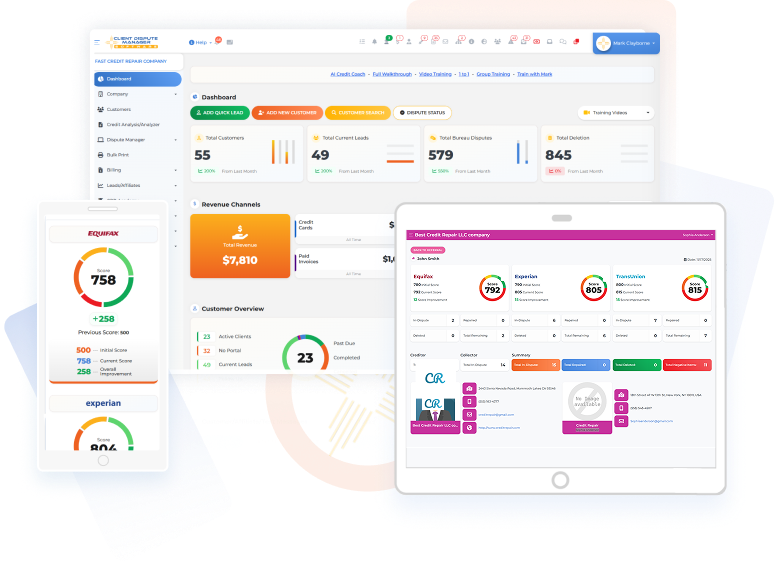
Managing field-level Metro 2 disputes manually might work when you’re handling one or two errors on your credit report. But when you’re tracking multiple accounts, documenting different data field violations, and following up with multiple furnishers, it becomes overwhelming fast.
This is exactly why we built Client Dispute Manager Software. Our platform helps you organize your disputes using Metro 2 standards, track each data field error, and maintain the documentation you need to hold furnishers accountable under the Fair Credit Reporting Act.
With features like automated dispute letter generation for metro 2 compliance disputes, compliance tracking for FCRA Section 623 requirements, detailed account monitoring, and secure document storage, you’ll have everything you need to execute these nine techniques systematically following proper credit bureau dispute procedures.
The software helps you identify which Metro 2 fields are in question, tracks furnisher responses, and keeps your dispute timeline organized.
You don’t need to be a credit expert to use metro 2 credit repair disputes effectively. You just need the right tools and the knowledge you’ve gained from this article.
Start Today and Explore the Features Firsthand!
Frequently Asked Questions About Metro 2 Credit Repair Disputes
Are Metro 2 Credit Repair Disputes Legal?
Absolutely. Metro 2 disputes are fully compliant with the Fair Credit Reporting Act. You’re simply requesting validation of specific data fields that furnishers are already required to report accurately under FCRA Section 623. You’re not using loopholes or tricks you’re holding companies to the metro 2 credit reporting standards they’re supposed to follow.
Should I Dispute with The Credit Bureau or The Furnisher?
For metro 2 credit reporting disputes, you’ll get better results disputing directly with the furnisher (the company reporting the information). Bureaus act as middlemen in traditional credit bureau dispute procedures and typically just forward your dispute anyway.
When you go directly to the source using credit report disputes using metro 2, you’re forcing the company that controls the data to validate their own reporting.
How Long Does the Metro 2 Dispute Process Take?
Under Fair Credit Reporting Act Section 611, furnishers have 30 days to investigate disputes sent through credit bureaus. When you dispute directly with furnishers, they should respond within a reasonable timeframe typically 30-45 days. If they don’t respond or can’t validate the data field you challenged, that creates stronger grounds for requesting correction when errors exist.
How Does Client Dispute Manager Software Help Me Track Metro 2 Field-specific Disputes Across Multiple Accounts?
When you’re disputing multiple accounts using Metro 2 techniques, it’s easy to lose track of which data fields you’ve challenged on each account, what documentation you’ve sent, and when you should expect responses from different furnishers.
Client Dispute Manager Software solves this by giving you a centralized dashboard where you can:
- Document specific Metro 2 fields for each dispute (payment history codes, balance amounts, dates of first delinquency, status codes, etc.)
- Track dispute timelines so you know exactly when the 30-day investigation period expires for each furnisher
- Store all supporting documentation in one secure location settlement letters, account statements, payment confirmations organized by account
- Generate professional dispute letters that cite the specific Metro 2 data fields and FCRA sections relevant to your challenge
- Monitor furnisher responses and maintain a complete audit trail of all communication
The software essentially acts as your command center for managing field-level disputes. Instead of juggling spreadsheets, paper files, and calendar reminders, you have everything organized in one place. This is especially valuable when you’re tracking 3-5 different accounts with multiple data field errors on each one.
Start Today and Explore the Features Firsthand!
Conclusion
You now have nine powerful techniques that transform how you approach credit repair. You’re no longer limited to vague disputes that get rubber-stamped as “verified” through traditional credit bureau dispute procedures. You’re equipped to challenge specific data fields, cite metro 2 credit reporting standards, and hold furnishers accountable to the accuracy requirements they’re supposed to follow under the Fair Credit Reporting Act.
Start with one technique. Choose the error on your credit report that bothers you most maybe it’s a late payment that shouldn’t be there, a balance that’s inflated, or a date that’s extending how long something reports. Apply the relevant technique for credit report disputes using metro 2 from this article. Document everything. Send your metro 2 compliance disputes directly to the furnisher.
Your credit repair results are about to improve because you’re no longer playing by the bureaus’ rules. You’re holding furnishers to their own reporting standards and using field-level disputes to get the accuracy you deserve.

Mark Clayborne
Mark Clayborne specializes in credit repair, starting and running credit repair businesses. He's passionate about helping businesses gain freedom from their 9-5 and live the life they really want. You can follow him on YouTube.
Start Today and Explore the Features Firsthand!
Below Is More Content For Your Review:
