

Credit repair software with report analytics can organize account details, bureau reporting, balances, dates, status labels, and changes between imported reports. It can help staff find records that need closer review and prepare follow-up tasks.
It cannot decide that information is inaccurate, guarantee a deletion or score change, or replace human review. Staff should verify the report source, consumer details, and every important field before taking action.
A credit report may contain many accounts, dates, balances, statuses, and comments. Reviewing those details across several bureau sections can take time.
Credit report software can place the information into a clearer view, but a clear view is only the start. Your team still needs to check the source report, listen to the consumer, review supporting records, and approve each next step.
What Is Credit Report Analytics Software?

Credit report analytics software turns report data into organized fields, labels, summaries, and comparison views. Instead of reading every line from the beginning each time, staff can find accounts, bureau details, balances, dates, and status changes in one record.
The software may label an account as negative, changed, or inconsistent. That label should lead to a closer review. It does not prove that the information is inaccurate or that the account should be disputed.
The source credit report remains important. Staff should be able to compare the imported information with the original report before recording a decision or preparing correspondence.
Is Credit Report Analytics the Same as Credit Monitoring?
No. Credit monitoring and credit report analytics serve different purposes. Credit monitoring watches for changes in a consumer’s credit file and may provide access to updated reports or scores. Credit report analytics organizes and compares information from a report that is available through an approved source.
A platform may support both, but you should check each service separately. Ask which monitoring providers are supported, which report formats can be imported, how often updated information is available, and whether the monitoring service has a separate fee.
Also ask where the report comes from. Importing a report from a monitoring provider is not the same as connecting directly to Equifax, Experian, or TransUnion.
What Information Can Credit Report Analytics Organize?
Credit report analysis software may organize several parts of a consumer’s report. The exact fields depend on the report source and the software.
| Data Area | What Software May Show | What Staff Must Verify |
|---|---|---|
| Consumer Details | Names, addresses, and identifying fields | Correct consumer and current source report |
| Account Details | Creditor name, partial account number, balance, status, and dates | Each field against the report and supporting records |
| Bureau Reporting | Which bureau section lists an account | Whether the source file is complete and current |
| Review Labels | Negative, inconsistent, changed, or selected items | Whether the label matches the report and consumer's statement |
| Score Data | Scores included in the imported report | Score model, bureau, source, and date |
| Comparison Data | New, changed, or missing entries | Whether the change is real and what may explain it |
This organized view can help your staff work through a report in a consistent order. It can also make it easier to find missing information before someone prepares a dispute. However, the software should never turn a review label into an automatic factual or legal conclusion.
How Does Credit Report Import Work?

The import process depends on the software and the report provider. A common process starts when the consumer gives the required authorization and access information. Staff select a supported report source, run the import, and check the imported fields against the source report.
Before using an import tool, ask these questions:
- Which monitoring providers and report formats are supported?
- What authorization does the business need from the consumer?
- Can staff review the original report after import?
- What happens if the report format changes?
- How does the system handle failed imports and duplicate records?
- Which information must staff enter or correct manually?
Do not assume that every provider works with every credit repair platform. Review the report import options and test the full process with fictional information before importing a real client report.
How Should Staff Review an Imported Credit Report?
Staff should review the source, identity, key fields, and supporting records before choosing any action. A consistent process reduces missed details and creates a clearer record of what the team reviewed.
- Confirm the consumer’s identity and authorization.
- Confirm the monitoring provider and report source.
- Record the report date and each bureau section included.
- Record the score model and score date when the report shows them.
- Compare names, accounts, balances, statuses, and dates with the source report.
- Review the consumer’s statement and supporting documents.
- Separate possible inconsistencies from facts that the records support.
- Assign a staff member to review each proposed next step.
- Save dated notes that explain the decision.
For example, an analyzer may show different balances for the same account in two bureau sections. That difference needs review. One section may have a different update date. The account names may be slightly different.
One bureau may have received newer information. Staff should check the source pages and dates before deciding whether to ask the consumer a question, request another document, prepare a dispute, or take no action.
How Can Re-Imports Help Track Report Changes?
A re-import can help staff compare a newer report with an earlier report. Depending on the software, the comparison may show new accounts, changed balances, updated statuses, score changes, missing entries, or new negative information.
Record the date and source for both reports. A change has little meaning when staff cannot tell which report came first or whether the reports use the same source and score model.A changed or missing entry does not explain why the change happened.
It may reflect a creditor update, a bureau correction, a reporting delay, a different report format, or another event. Do not present the change as proof that your business caused it. Staff should verify the current report and document what changed without guessing about the reason.
What Must Stay Under Human Review?

Software can organize information and create a review list. Trained staff should remain responsible for factual, legal, and client decisions.
Keep people responsible for:
- Confirming identity and authorization
- Checking whether the report is current and complete
- Reviewing whether information may be inaccurate, incomplete, outdated, or connected to another person
- Matching documents to the consumer’s statement
- Choosing the reason for a dispute
- Reviewing the content and destination of correspondence
- Reading responses and selecting the next action
- Recording why the team made a decision
The FTC advises consumers to dispute inaccurate or incomplete information with the credit bureau and the business that supplied it. Supporting documents and clear records matter. Software can support that work, but it cannot replace the consumer’s facts or advice from a qualified legal professional.
What Should You Test During an Analytics Demonstration?
Use the same fictional report and test steps for every platform. A guided demonstration may look smooth, but you need to see how the software handles ordinary review work and unexpected problems.
- Import a supported sample report.
- Check names, dates, balances, statuses, bureau sections, and scores against the source.
- Find one account across every available bureau section.
- Review how the software labels negative or inconsistent information.
- Ask the provider to explain which fields are imported and which fields the system creates.
- Re-import a changed sample and inspect the comparison.
- Add a review note and assign a task.
- Check staff permissions and activity history.
- Export the report data, notes, and comparison history.
- Test a failed import and a possible duplicate.
Do not test with a real consumer’s report unless the trial has been approved for real client data and you have completed your security, privacy, and authorization review.
How Client Dispute Manager Software Supports Credit Report Review?
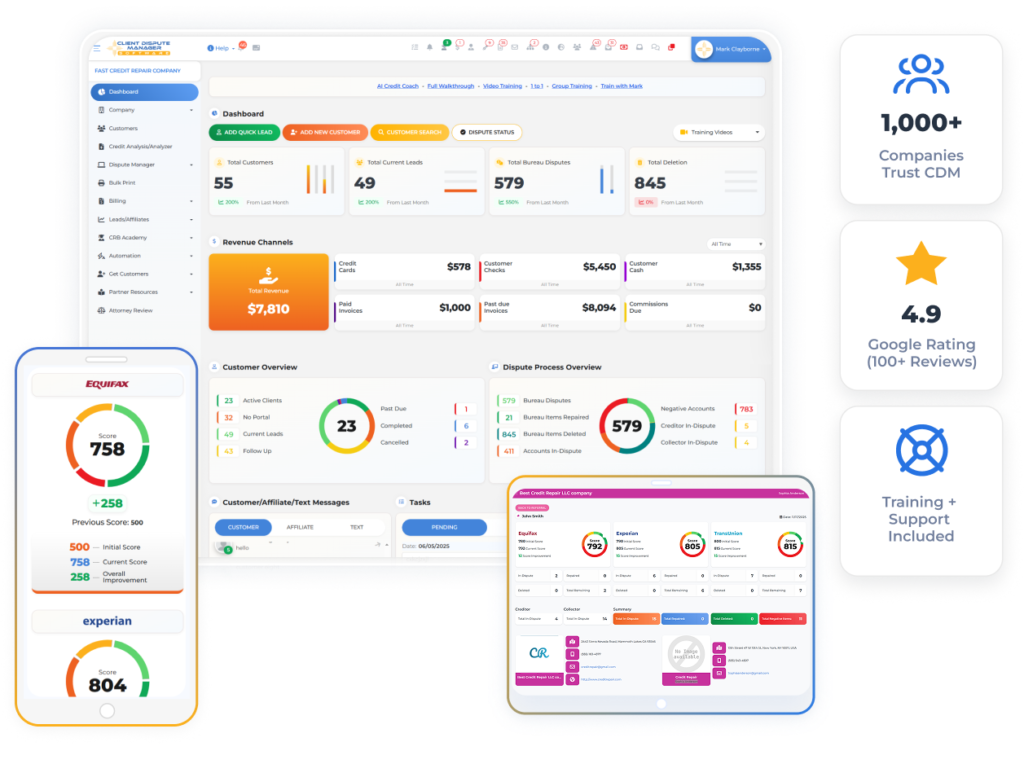
Client Dispute Manager includes several tools for organizing credit report review. Credit Analysis can create a report summary. Credit Analyzer can help staff review negative accounts and possible inconsistencies.
Progress Report can show changes between earlier and current information. Smart Interviewer collects the client’s answers for staff to review. The current import page lists SmartCredit, MyFreeScoreNow, IdentityIQ, MyScoreIQ, and PrivacyGuard as supported monitoring sources.
Provider access and available features may depend on the current plan and service terms. Client Dispute Manager does not directly integrate with the credit bureaus. Its tools import and organize report information from supported sources.
Your staff must still check the source report, client statements, supporting records, and proposed next steps. Before signup, confirm current provider support, plan access, import limits, staff permissions, re-import behavior, and export options.
You can request a software demonstration or use the current 30-day free trial to test the workflow with fictional information. Confirm the trial terms before starting.
Credit Report Analytics Review Checklist
Use this checklist before approving your report review process:
- Confirm the consumer’s identity and authorization.
- Record the report source and date.
- Verify important imported fields.
- Keep the original report available.
- Record the consumer’s statements.
- Check supporting documents.
- Require staff approval before automated dispute action.
- Compare re-imports without assuming why a change happened.
- Test staff access, exports, and access removal.
- Keep a dated record of each decision.
A short checklist gives staff a repeatable process. It also makes gaps easier to find during training or a record review.
Frequently Asked Questions
Is a Credit Report Analyzer the Same as a Credit Bureau?
No. A credit report analyzer organizes or compares data from a report source. It is not Equifax, Experian, or TransUnion. It does not control bureau records or investigation results. Ask where the report came from, when it was created, and how the software imported each field.
Can Credit Report Analytics Find Every Error?
No. Analytics may flag differences, negative entries, missing fields, or changed information. Staff must compare those flags with the source report, the consumer’s statement, and supporting documents. Some errors may not follow a pattern that software can detect. A flag starts a review. It does not settle the issue.
Can Credit Repair Software Import Reports From Every Provider?
Not always. Supported providers, report formats, fields, and import methods vary. Confirm the exact provider and report type before choosing a platform. Ask about consumer authorization, separate monitoring fees, import limits, failed logins, format changes, and manual corrections. Test the source your business expects to use.
Does Credit Report Analytics Predict Credit Score Changes?
Report analytics and score simulation are different features. Do not assume that an analytics tool predicts future scores. When software displays a score, check the model, bureau, report source, and date. Many factors can affect a score, so a business should not promise a specific increase or timeline.
Should Staff Review Every Imported Credit Report?
Yes. At a minimum, staff should verify the consumer, source, report date, bureau sections, key account fields, and any proposed action. Review the record more closely when it contains missing fields, conflicting dates, duplicate accounts, unusual labels, or a failed import. Save notes that explain what staff checked.
Review the Report Before You Act
Credit report software can turn a long report into a clearer review process. It can organize account data, compare imports, and help staff find records that need attention. The value comes from using those tools with careful human review.
Choose a platform that lets your team check the source, understand each label, record decisions, control access, and export the history. Test one fictional report from import through re-import before using the process with clients.
If Client Dispute Manager Software fits your written requirements, use the current trial to test Credit Analysis, Credit Analyzer, Progress Report, Smart Interviewer, and supported report imports. Confirm current features and terms before signup.

Mark Clayborne
Mark Clayborne specializes in credit repair, starting and running credit repair businesses. He's passionate about helping businesses gain freedom from their 9-5 and live the life they really want. You can follow him on YouTube.
Start Today and Explore the Features Firsthand!
